cancel
Showing results for 
Search instead for 
Did you mean: 

Vote for your favorite vizzies from the Power BI Dataviz World Championship submissions. Vote now!

Reply
juncco888
Advocate I
Advocate I

Ranking Assistance with RANKX

Hi again,

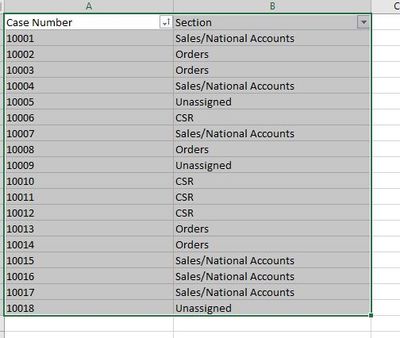
I am trying to use RANKX to get the Sections with the most number of Cases.

Here is some sample data:


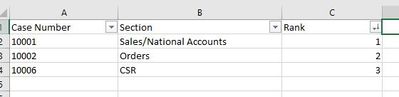
forum1.JPGMy Expected result is:

forum2.JPG


I have tried several things but can't get the cases counted by section and then use rankx to rank the number of cases by section.  I am trying to do this as a measure and not create a column of the number of cases per section.
 
Any help would be greatly appreciated.
 
Thanks
Kyle
1 ACCEPTED SOLUTION
selimovd
Super User
Super User

Hey @juncco888 ,


if you don't put the "Case Number" in your table (like in your last example), the following measure should work:

Rank = RANKX( ALL( myTable[Section] ), CALCULATE( COUNTROWS( myTable ) ) )


If you need any help please let me know.
If I answered your question I would be happy if you could mark my post as a solution ✔️ and give it a thumbs up 👍
 
Best regards
Denis
 

View solution in original post

2 REPLIES 2
selimovd
Super User
Super User

Hey @juncco888 ,


if you don't put the "Case Number" in your table (like in your last example), the following measure should work:

Rank = RANKX( ALL( myTable[Section] ), CALCULATE( COUNTROWS( myTable ) ) )


If you need any help please let me know.
If I answered your question I would be happy if you could mark my post as a solution ✔️ and give it a thumbs up 👍
 
Best regards
Denis
 

Thank you so much!  That worked perfectly.  I added the order and tiebreaking arguments just to see how they worked out.  


I really appreciate your help!


Kyle

Helpful resources

Announcements
Power BI DataViz World Championships

Power BI Dataviz World Championships

Vote for your favorite vizzies from the Power BI World Championship submissions!

Sticker Challenge 2026 Carousel

Join our Community Sticker Challenge 2026

If you love stickers, then you will definitely want to check out our Community Sticker Challenge!

January Power BI Update Carousel

Power BI Monthly Update - January 2026

Check out the January 2026 Power BI update to learn about new features.

FabCon Atlanta 2026 carousel

FabCon Atlanta 2026

Join us at FabCon Atlanta, March 16-20, for the ultimate Fabric, Power BI, AI and SQL community-led event. Save $200 with code FABCOMM.