Join us at FabCon Atlanta from March 16 - 20, 2026, for the ultimate Fabric, Power BI, AI and SQL community-led event. Save $200 with code FABCOMM.
Register now!The Power BI Data Visualization World Championships is back! It's time to submit your entry. Live now!
Hi Everyone!
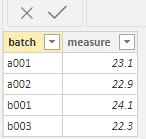
I have a table that looks like this,
I want to crear a Rank calculated column based on the batch number, for example batch no. a001 will be 1 and so on
the result have to be like that:
batch measure rank
a001 23.1 1
a001 22.9 1
b001 24.1 2
b003 23.9 3
I will appreciate some help!
Kind Regards
Christian
Solved! Go to Solution.
@Anonymous , Try like
rank = rankx(all(Table),[batch],,asc,dense)
OR For Rank Refer these links
https://radacad.com/how-to-use-rankx-in-dax-part-2-of-3-calculated-measures
https://radacad.com/how-to-use-rankx-in-dax-part-1-of-3-calculated-columns
https://radacad.com/how-to-use-rankx-in-dax-part-3-of-3-the-finale
https://community.powerbi.com/t5/Community-Blog/Dynamic-TopN-made-easy-with-What-If-Parameter/ba-p/367415
@Anonymous , Try like
rank = rankx(all(Table),[batch],,asc,dense)
OR For Rank Refer these links
https://radacad.com/how-to-use-rankx-in-dax-part-2-of-3-calculated-measures
https://radacad.com/how-to-use-rankx-in-dax-part-1-of-3-calculated-columns
https://radacad.com/how-to-use-rankx-in-dax-part-3-of-3-the-finale
https://community.powerbi.com/t5/Community-Blog/Dynamic-TopN-made-easy-with-What-If-Parameter/ba-p/367415
The Power BI Data Visualization World Championships is back! It's time to submit your entry.
Check out the January 2026 Power BI update to learn about new features.
| User | Count |
|---|---|
| 56 | |
| 41 | |
| 39 | |
| 20 | |
| 20 |
| User | Count |
|---|---|
| 146 | |
| 110 | |
| 63 | |
| 38 | |
| 35 |