Join us at FabCon Atlanta from March 16 - 20, 2026, for the ultimate Fabric, Power BI, AI and SQL community-led event. Save $200 with code FABCOMM.
Register now!The Power BI Data Visualization World Championships is back! Get ahead of the game and start preparing now! Learn more
Hey Guys,
I have created a Rank function with a Top/Bottom filter. It's working, but it is acting kinda weird. Please see the attached image does anybody know why is that or what's wrong? It's showing the same rank even though they are not the same numbers that we rank by.
Equation -
Rank = IF(
HASONEVALUE('Top/Bottom'[Order]),
SWITCH(
VALUES('Top/Bottom'[Order]),
"Top 10", RANKX(ALL(Store_dim[StoreName]),[GP per Customer],,DESC,Dense),
RANKX(ALL(Store_dim[StoreName]),[GP per Customer],,ASC,Dense)
))This is a very large file. I try to upload a sample file but it did not work. Sorry about that.
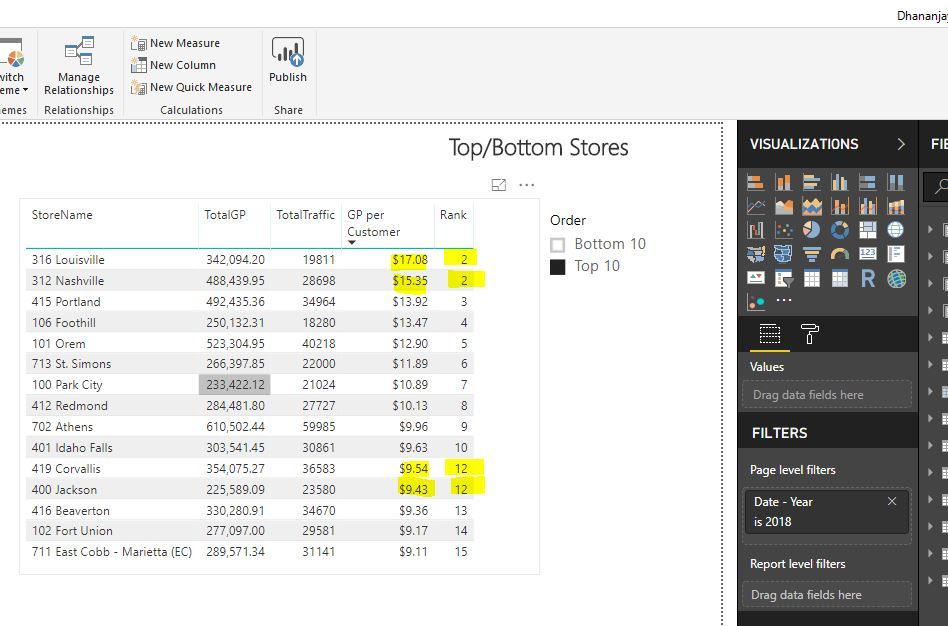
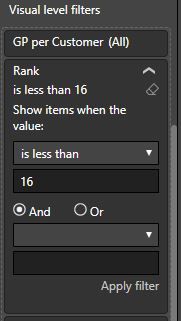
One more thing, when I filter by Rank is less than 16, that is when my chart get weird
Thank you so much
Solved! Go to Solution.
Hi @Anonymous,
Please modify the formula to below for a test.
Rank = IF(
HASONEVALUE('Top/Bottom'[Order]),
SWITCH(
VALUES('Top/Bottom'[Order]),
"Top 10", RANKX(ALLSELECTED(Store_dim),[GP per Customer],,DESC,Dense),
RANKX(ALLSELECTED(Store_dim),[GP per Customer],,ASC,Dense)
))
Regards,
Yuliana Gu
Hi @Anonymous,
Please modify the formula to below for a test.
Rank = IF(
HASONEVALUE('Top/Bottom'[Order]),
SWITCH(
VALUES('Top/Bottom'[Order]),
"Top 10", RANKX(ALLSELECTED(Store_dim),[GP per Customer],,DESC,Dense),
RANKX(ALLSELECTED(Store_dim),[GP per Customer],,ASC,Dense)
))
Regards,
Yuliana Gu
The Power BI Data Visualization World Championships is back! Get ahead of the game and start preparing now!
| User | Count |
|---|---|
| 39 | |
| 37 | |
| 33 | |
| 32 | |
| 29 |
| User | Count |
|---|---|
| 133 | |
| 88 | |
| 85 | |
| 68 | |
| 64 |