cancel
Showing results for 
Search instead for 
Did you mean: 

Did you hear? There's a new SQL AI Developer certification (DP-800). Start preparing now and be one of the first to get certified. Register now

Reply
Anonymous
Not applicable

Rank does not work

Hey Guys, 


I have created a Rank function with a Top/Bottom filter. It's working, but it is acting kinda weird. Please see the attached image does anybody know why is that or what's wrong? It's showing the same rank even though they are not the same numbers that we rank by. 


Equation - 

Rank = IF(
                    HASONEVALUE('Top/Bottom'[Order]),
                        SWITCH(
                            VALUES('Top/Bottom'[Order]),
                            "Top 10", RANKX(ALL(Store_dim[StoreName]),[GP per Customer],,DESC,Dense),
                           RANKX(ALL(Store_dim[StoreName]),[GP per Customer],,ASC,Dense)
                        ))
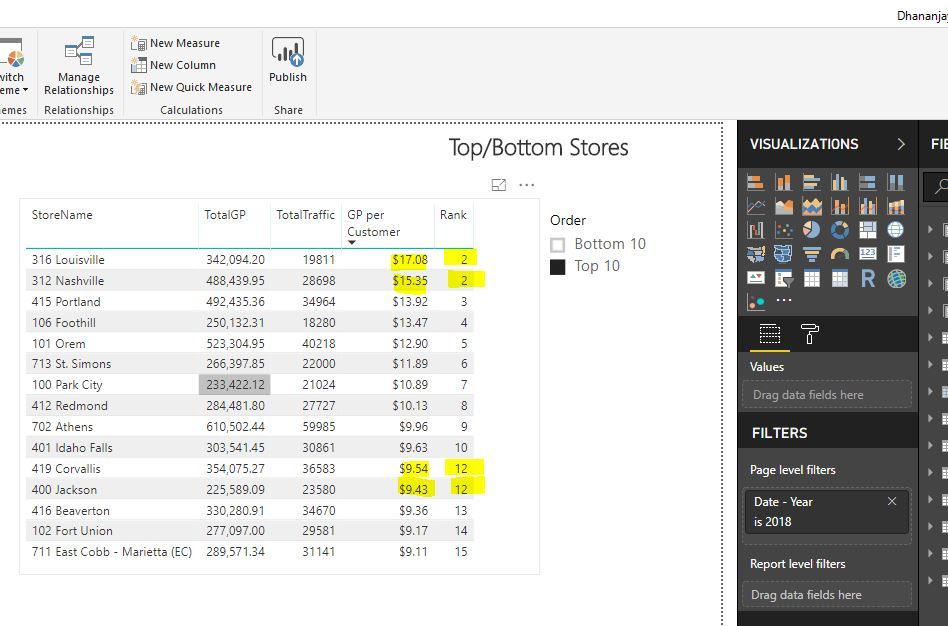
Ranks.JPG

This is a very large file. I try to upload a sample file but it did not work. Sorry about that. 


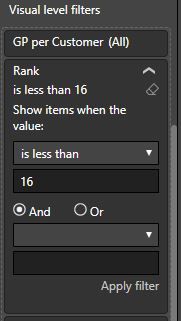
One more thing, when I filter by Rank is less than 16, that is when my chart get weird Filter.JPG


Thank you so much 


1 ACCEPTED SOLUTION
v-yulgu-msft
Microsoft Employee
Microsoft Employee

Hi @Anonymous,


Please modify the formula to below for a test.

Rank = IF(
                    HASONEVALUE('Top/Bottom'[Order]),
                        SWITCH(
                            VALUES('Top/Bottom'[Order]),
                            "Top 10", RANKX(ALLSELECTED(Store_dim),[GP per Customer],,DESC,Dense),
                           RANKX(ALLSELECTED(Store_dim),[GP per Customer],,ASC,Dense)
                        ))


Regards,
Yuliana Gu

Community Support Team _ Yuliana Gu
If this post helps, then please consider Accept it as the solution to help the other members find it more quickly.

View solution in original post

2 REPLIES 2
v-yulgu-msft
Microsoft Employee
Microsoft Employee

Hi @Anonymous,


Please modify the formula to below for a test.

Rank = IF(
                    HASONEVALUE('Top/Bottom'[Order]),
                        SWITCH(
                            VALUES('Top/Bottom'[Order]),
                            "Top 10", RANKX(ALLSELECTED(Store_dim),[GP per Customer],,DESC,Dense),
                           RANKX(ALLSELECTED(Store_dim),[GP per Customer],,ASC,Dense)
                        ))


Regards,
Yuliana Gu

Community Support Team _ Yuliana Gu
If this post helps, then please consider Accept it as the solution to help the other members find it more quickly.
Anonymous
Not applicable

@v-yulgu-msft


Thank you for the help. This is working. I appreciate your time. 

Helpful resources

Announcements
April Power BI Update Carousel

Power BI Monthly Update - April 2026

Check out the April 2026 Power BI update to learn about new features.

Fabric SQL PBI Data Days

Data Days 2026 coming soon!

Sign up to receive a private message when registration opens and key events begin.

New to Fabric survey Carousel

New to Fabric Survey

If you have recently started exploring Fabric, we'd love to hear how it's going. Your feedback can help with product improvements.

Power BI DataViz World Championships carousel

Power BI DataViz World Championships - June 2026

A new Power BI DataViz World Championship is coming this June! Don't miss out on submitting your entry.