Get certified for free when you join Fabric Data Days 2026 and dive into Fabric, Power BI, SQL, AI, and other essential data skills.
Join nowJuly 28 - August 9 | Final Round of the Power BI Dataviz World Championships. This is your chance. Learn more
Hi, I saw this old question online and wanted to ask because unlike the question posted here - https://community.powerbi.com/t5/Desktop/Group-By-ID-and-rank-it-in-sequence-of-date/m-p/687683
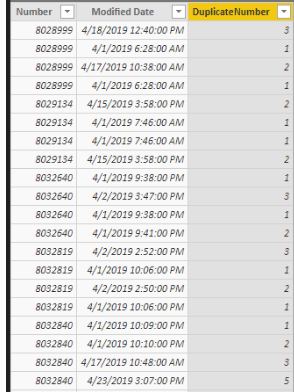
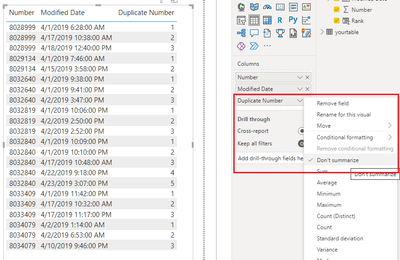
I want to rank it without duplicates. So if a Number like 8028999 had 3 same modified date and time, it should be 1,2,3 and not all 1.
I followed the formula found in the link too but for my data, I need to avoid duplicated sequence.
DuplicateNumber = RANKX(FILTER('Table', 'Table'[Number] = EARLIER('Table'[Number])), 'Table'[Modified Date], , ASC, DenseSolved! Go to Solution.
Hi @Honne2021
Here is my solution with Power Query.
Step #1
First sort Number column ascendingly. Then sort Modified Date ascendingly.

Step #2
From Transform > Group By, group by Number column and select All Rows for the new "AllData" column.
Step #3
Add a custom column with below code
Table.AddIndexColumn([AllData],"Index",1,1)
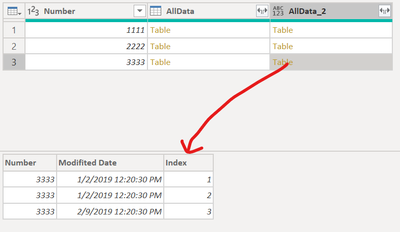
Every Table value in AllData_2 column will have an Index column like below.
Step #4
Remove Number and AllData columns. Preserve only AllData_2 in the query. Expand AllData_2 column.
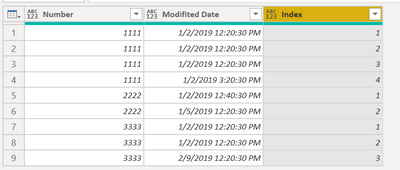
You will have the result you want.
Full M code
let
Source = Table.FromRows(Json.Document(Binary.Decompress(Binary.FromText("i45WMgQCJR0lIwNDS31DfSMFQyMrIwMrYwOFAF+lWB0ayJuiyhsBAULeFEM/qjzYfBNkeWMgwGc/sryRviVeeQz9sQA=", BinaryEncoding.Base64), Compression.Deflate)), let _t = ((type nullable text) meta [Serialized.Text = true]) in type table [Number = _t, #"Modifited Date" = _t]),
#"Changed Type" = Table.TransformColumnTypes(Source,{{"Number", Int64.Type}, {"Modifited Date", type datetime}}),
#"Sorted Rows" = Table.Sort(#"Changed Type",{{"Number", Order.Ascending}, {"Modifited Date", Order.Ascending}}),
#"Grouped Rows" = Table.Group(#"Sorted Rows", {"Number"}, {{"AllData", each _, type table [Number=nullable number, Modifited Date=nullable datetime]}}),
#"Added Custom" = Table.AddColumn(#"Grouped Rows", "AllData_2", each Table.AddIndexColumn([AllData],"Index",1,1)),
#"Removed Other Columns" = Table.SelectColumns(#"Added Custom",{"AllData_2"}),
#"Expanded AllData_2" = Table.ExpandTableColumn(#"Removed Other Columns", "AllData_2", {"Number", "Modifited Date", "Index"}, {"Number", "Modifited Date", "Index"})
in
#"Expanded AllData_2"
Cheers
If this reply helps solve the problem, please mark it as Solution! Kudos are appreciated too!
-
Hi @Honne2021
Here is my solution with Power Query.
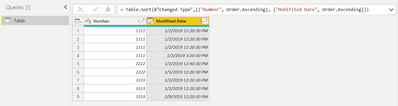
Step #1
First sort Number column ascendingly. Then sort Modified Date ascendingly.
Step #2
From Transform > Group By, group by Number column and select All Rows for the new "AllData" column.
Step #3
Add a custom column with below code
Table.AddIndexColumn([AllData],"Index",1,1)
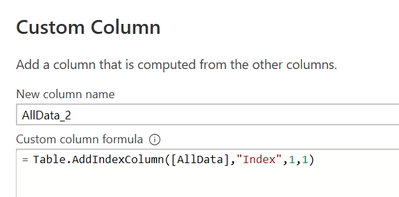
Every Table value in AllData_2 column will have an Index column like below.
Step #4
Remove Number and AllData columns. Preserve only AllData_2 in the query. Expand AllData_2 column.
You will have the result you want.
Full M code
let
Source = Table.FromRows(Json.Document(Binary.Decompress(Binary.FromText("i45WMgQCJR0lIwNDS31DfSMFQyMrIwMrYwOFAF+lWB0ayJuiyhsBAULeFEM/qjzYfBNkeWMgwGc/sryRviVeeQz9sQA=", BinaryEncoding.Base64), Compression.Deflate)), let _t = ((type nullable text) meta [Serialized.Text = true]) in type table [Number = _t, #"Modifited Date" = _t]),
#"Changed Type" = Table.TransformColumnTypes(Source,{{"Number", Int64.Type}, {"Modifited Date", type datetime}}),
#"Sorted Rows" = Table.Sort(#"Changed Type",{{"Number", Order.Ascending}, {"Modifited Date", Order.Ascending}}),
#"Grouped Rows" = Table.Group(#"Sorted Rows", {"Number"}, {{"AllData", each _, type table [Number=nullable number, Modifited Date=nullable datetime]}}),
#"Added Custom" = Table.AddColumn(#"Grouped Rows", "AllData_2", each Table.AddIndexColumn([AllData],"Index",1,1)),
#"Removed Other Columns" = Table.SelectColumns(#"Added Custom",{"AllData_2"}),
#"Expanded AllData_2" = Table.ExpandTableColumn(#"Removed Other Columns", "AllData_2", {"Number", "Modifited Date", "Index"}, {"Number", "Modifited Date", "Index"})
in
#"Expanded AllData_2"
Cheers
If this reply helps solve the problem, please mark it as Solution! Kudos are appreciated too!
-
Join us in Barcelona for FabCon and SQLCon, the Fabric, Power BI, SQL, and AI community event. Save €200 with code FABCMTY200.
If you love stickers, then you will definitely want to check out our community sticker challenge, Barcelona edition!
Check out the July 2026 Power BI update to learn about new features.
| User | Count |
|---|---|
| 26 | |
| 22 | |
| 22 | |
| 20 | |
| 17 |
| User | Count |
|---|---|
| 35 | |
| 29 | |
| 21 | |
| 19 | |
| 17 |