Join us at FabCon Atlanta from March 16 - 20, 2026, for the ultimate Fabric, Power BI, AI and SQL community-led event. Save $200 with code FABCOMM.
Register now!Vote for your favorite vizzies from the Power BI Dataviz World Championship submissions. Vote now!
Hi All,
I'm facing with rank problem.
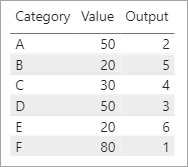
I want to give rank to below values. If it is equals it doesn't matter select one of them or sort by Category
I tried this dax but it gives same rank if the values are equal
Measure = RANKX(ALLSELECTED(Table1),CALCULATE(SUM(Table1[Values]),ALLEXCEPT(Table1,Table1[Cat])),,DESC,Dense)
I copied it from anouther post...
https://community.powerbi.com/t5/Desktop/Ranking-a-measure/td-p/539066
I want this output on measure not column...
Category Values
| A | 50 |
| B | 20 |
| C | 30 |
| D | 50 |
| E | 20 |
| F | 80 |
Expected Output
CategoryValuesOutput
| A | 50 | 2 |
| B | 20 | 5 |
| C | 30 | 4 |
| D | 50 | 3 |
| E | 20 | 6 |
| F | 80 | 1 |
Thanks All,
Solved! Go to Solution.
@Anonymous
I was able to replicate your desired output with this.
Output =
VAR _Category = SELECTEDVALUE ( 'DataTable'[Category] )
VAR _Value = SELECTEDVALUE ( 'DataTable'[Value] )
VAR _Rank =
COUNTROWS ( FILTER ( ALL ( 'DataTable' ), 'DataTable'[Value] > _Value ) ) + 1
VAR _TieBreak =
COUNTROWS (
FILTER (
ALL ( 'DataTable' ),
'DataTable'[Category] < _Category
&& 'DataTable'[Value] = _Value
)
)
RETURN
_Rank + _TieBreak
@Anonymous
I was able to replicate your desired output with this.
Output =
VAR _Category = SELECTEDVALUE ( 'DataTable'[Category] )
VAR _Value = SELECTEDVALUE ( 'DataTable'[Value] )
VAR _Rank =
COUNTROWS ( FILTER ( ALL ( 'DataTable' ), 'DataTable'[Value] > _Value ) ) + 1
VAR _TieBreak =
COUNTROWS (
FILTER (
ALL ( 'DataTable' ),
'DataTable'[Category] < _Category
&& 'DataTable'[Value] = _Value
)
)
RETURN
_Rank + _TieBreak
Vote for your favorite vizzies from the Power BI World Championship submissions!
If you love stickers, then you will definitely want to check out our Community Sticker Challenge!
Check out the January 2026 Power BI update to learn about new features.
| User | Count |
|---|---|
| 70 | |
| 51 | |
| 42 | |
| 29 | |
| 22 |
| User | Count |
|---|---|
| 143 | |
| 118 | |
| 56 | |
| 37 | |
| 31 |