cancel
Showing results for 
Search instead for 
Did you mean: 

Data Days is here! Join us now for 60+ days of learning, challenges, and connection. Learn more

Reply
captainlaw
Microsoft Employee
Microsoft Employee

RLS with UserName()

Hello Community, 


I have two tables, Table A (state, population) Table B (username, state).

Is there a way to setup RLS using username() to reference Table B(username) column to return the value of Table B(state) and join the data to Table A(state)?


On a separate but related question - Is there a way to assign a Parameter using UserName()?


Your help is much appreciated.

1 ACCEPTED SOLUTION
GilbertQ
Super User
Super User

Hi there, you can most certainly do this.


I would suggest reading my blog post, which just gives some explanations around when deploying to the Power BI Service and what to look out for.


https://gqbi.wordpress.com/2016/10/03/power-bi-dynamic-row-level-security-things-you-need-to-know-to...


And then here is a great blog post by Kasper De Jonge, in which he gives a working example how to get RLS working. And also provides a sample PBIX file. 


http://www.kasperonbi.com/power-bi-desktop-dynamic-security-cheat-sheet/ 


Did I answer your question? Mark my post as a solution!

Proud to be a Super User!


Power BI Blog

View solution in original post

5 REPLIES 5
GilbertQ
Super User
Super User

Hi there, you can most certainly do this.


I would suggest reading my blog post, which just gives some explanations around when deploying to the Power BI Service and what to look out for.


https://gqbi.wordpress.com/2016/10/03/power-bi-dynamic-row-level-security-things-you-need-to-know-to...


And then here is a great blog post by Kasper De Jonge, in which he gives a working example how to get RLS working. And also provides a sample PBIX file. 


http://www.kasperonbi.com/power-bi-desktop-dynamic-security-cheat-sheet/ 


Did I answer your question? Mark my post as a solution!

Proud to be a Super User!


Power BI Blog

BTW, how come there's not a way to assign username() function within a parameter?  If there's a way, I could restrict data at the import layer instead of at filtering layer to improve performance.


Any idea?

Hi there,


That is a by design feature and in order for RLS to work correctly, you always have to have the entire dataset. 


This ensures that if you have a user who needs access to everything this can be achieved. 

This also ensures that dynamic RLS can be achieved without having to re-create not only the charts but also the dataset.


If I understand you correctly you would want to only bring in the data for the specific user?

If that is the case you would then have to have a specific dataset per user, which would increase the size of each individual model.


By keeping all the data in one model and leveraging RLS ensures that the data is complete and consistent across the different users.


Did I answer your question? Mark my post as a solution!

Proud to be a Super User!


Power BI Blog

You addressed my concern perfectly.  Thank you once again!

Hi

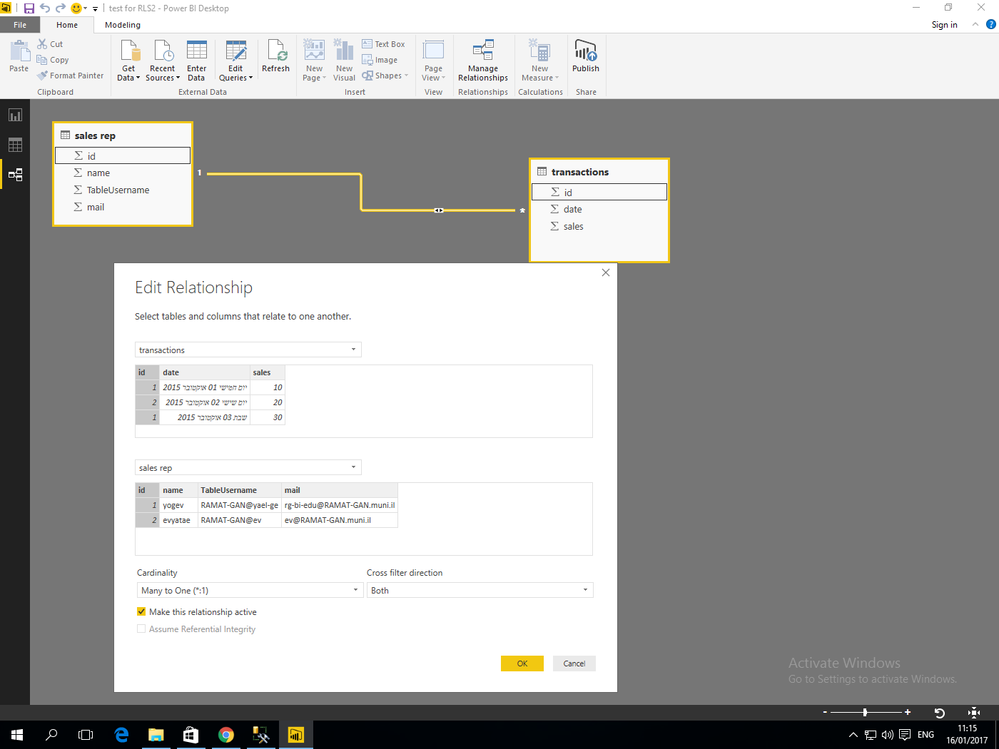
why i don't have (on the join) the option for “Apply security filter in both directions”...?

attach pictureno security join.png

Helpful resources

Announcements
Fabric Data Days is here Carousel

Fabric Data Days 2026

Don't miss out on Data Days, June 15 through August 7. Learn Fabric, Power BI, SQL, AI and more.

May Power BI Update Carousel

Power BI Monthly Update - May 2026

Check out the May 2026 Power BI update to learn about new features.

Power BI DataViz World Championships carousel

Power BI DataViz World Championships - June 2026

A new Power BI DataViz World Championship is coming this June! Don't miss out on submitting your entry.