cancel
Showing results for 
Search instead for 
Did you mean: 

We've captured the moments from FabCon & SQLCon that everyone is talking about, and we are bringing them to the community, live and on-demand. Starts on April 14th. Register now

Reply
palvarez
New Member

R Script ggplot Line Plot

Hello,


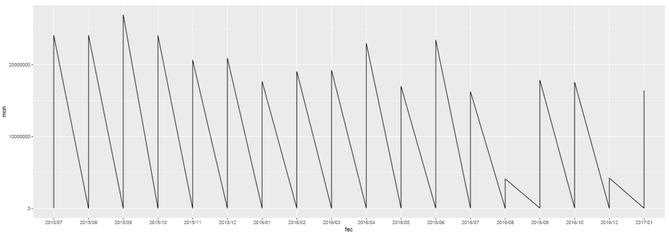
I'm trying for the first time ever R Scripting with ggplot. However I've encountered a small roadblock. While attempting to do a line chart, why does my data plunges to 0 but lines back to the number it should be? My data doesn't behave in such way, so what am I missing? I'm truly an beginner in this topic, so it might be something dumb, however I haven't found any answers online yet.


image.png


library(ggplot2)
library(gtable)
library(grid)
#library(extrafont)

data <- dataset
mon <- data$Monto
trans <- data$Transacciones
fec <- format(as.Date(data$Fecha), "%Y/%m")

options(scipen=999)
p1 <- ggplot(data, aes(fec, mon, group = 1)) + geom_line()

p1


* Note: I've been attempting to create a visual of two y axes. That's why I'm using ggplot. I'm halfway there, but I need to get this fixed first.

1 ACCEPTED SOLUTION
v-sihou-msft
Microsoft Employee
Microsoft Employee

@palvarez


Based on your code, it seems you put date field into your dataset. I assume you have data on day level. As you format your Date into "YearMonth", which means you have multiple data point on same X axis category. This the reason why your line goes crazy. 


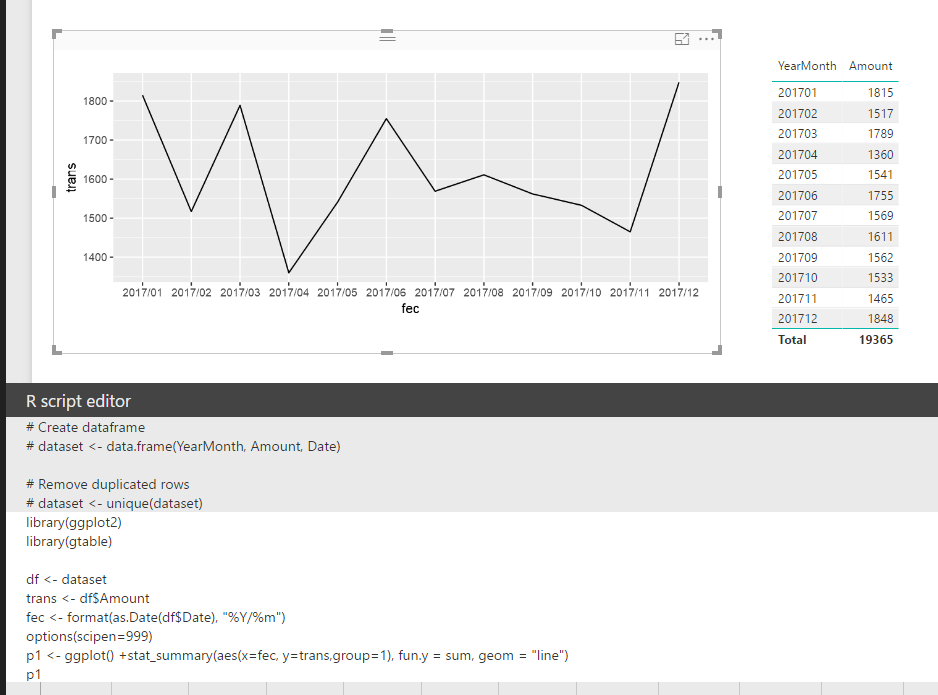
In your scenario, you should use stat_summary() function to have those data points aggregate on each "YearMonth". Please refer to my sample below: 


library(ggplot2)
library(gtable)

df <- dataset
trans <- df$Amount
fec <- format(as.Date(df$Date), "%Y/%m")
options(scipen=999)
p1 <- ggplot() +stat_summary(aes(x=fec, y=trans,group=1), fun.y = sum, geom = "line")
p1

123.PNG


Regards,

View solution in original post

1 REPLY 1
v-sihou-msft
Microsoft Employee
Microsoft Employee

@palvarez


Based on your code, it seems you put date field into your dataset. I assume you have data on day level. As you format your Date into "YearMonth", which means you have multiple data point on same X axis category. This the reason why your line goes crazy. 


In your scenario, you should use stat_summary() function to have those data points aggregate on each "YearMonth". Please refer to my sample below: 


library(ggplot2)
library(gtable)

df <- dataset
trans <- df$Amount
fec <- format(as.Date(df$Date), "%Y/%m")
options(scipen=999)
p1 <- ggplot() +stat_summary(aes(x=fec, y=trans,group=1), fun.y = sum, geom = "line")
p1

123.PNG


Regards,

Helpful resources

Announcements
New to Fabric survey Carousel

New to Fabric Survey

If you have recently started exploring Fabric, we'd love to hear how it's going. Your feedback can help with product improvements.

Power BI DataViz World Championships carousel

Power BI DataViz World Championships - June 2026

A new Power BI DataViz World Championship is coming this June! Don't miss out on submitting your entry.

Join our Fabric User Panel

Join our Fabric User Panel

Share feedback directly with Fabric product managers, participate in targeted research studies and influence the Fabric roadmap.

March Power BI Update Carousel

Power BI Community Update - March 2026

Check out the March 2026 Power BI update to learn about new features.