Join us at FabCon Atlanta from March 16 - 20, 2026, for the ultimate Fabric, Power BI, AI and SQL community-led event. Save $200 with code FABCOMM.
Register now!The Power BI Data Visualization World Championships is back! Get ahead of the game and start preparing now! Learn more
Hello,
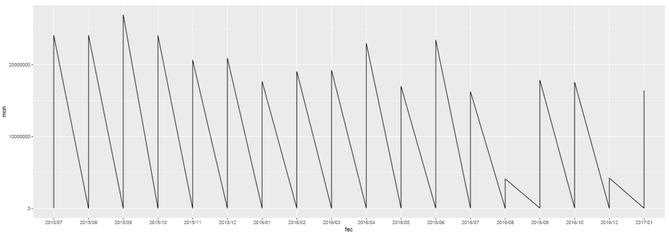
I'm trying for the first time ever R Scripting with ggplot. However I've encountered a small roadblock. While attempting to do a line chart, why does my data plunges to 0 but lines back to the number it should be? My data doesn't behave in such way, so what am I missing? I'm truly an beginner in this topic, so it might be something dumb, however I haven't found any answers online yet.
library(ggplot2) library(gtable) library(grid) #library(extrafont) data <- dataset mon <- data$Monto trans <- data$Transacciones fec <- format(as.Date(data$Fecha), "%Y/%m") options(scipen=999) p1 <- ggplot(data, aes(fec, mon, group = 1)) + geom_line() p1
* Note: I've been attempting to create a visual of two y axes. That's why I'm using ggplot. I'm halfway there, but I need to get this fixed first.
Solved! Go to Solution.
Based on your code, it seems you put date field into your dataset. I assume you have data on day level. As you format your Date into "YearMonth", which means you have multiple data point on same X axis category. This the reason why your line goes crazy.
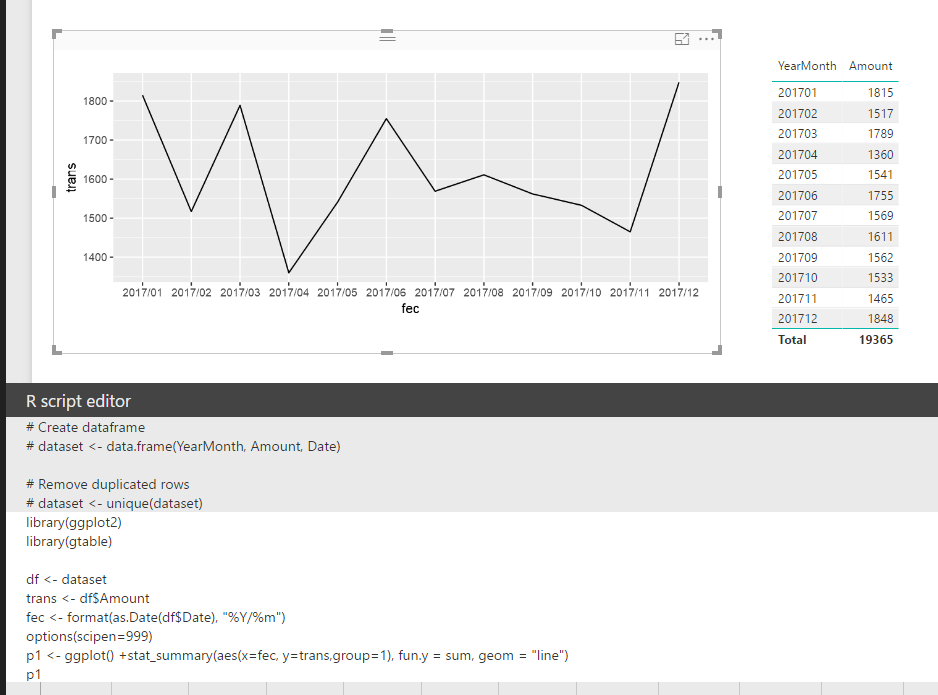
In your scenario, you should use stat_summary() function to have those data points aggregate on each "YearMonth". Please refer to my sample below:
library(ggplot2) library(gtable) df <- dataset trans <- df$Amount fec <- format(as.Date(df$Date), "%Y/%m") options(scipen=999) p1 <- ggplot() +stat_summary(aes(x=fec, y=trans,group=1), fun.y = sum, geom = "line") p1
Regards,
Based on your code, it seems you put date field into your dataset. I assume you have data on day level. As you format your Date into "YearMonth", which means you have multiple data point on same X axis category. This the reason why your line goes crazy.
In your scenario, you should use stat_summary() function to have those data points aggregate on each "YearMonth". Please refer to my sample below:
library(ggplot2) library(gtable) df <- dataset trans <- df$Amount fec <- format(as.Date(df$Date), "%Y/%m") options(scipen=999) p1 <- ggplot() +stat_summary(aes(x=fec, y=trans,group=1), fun.y = sum, geom = "line") p1
Regards,
The Power BI Data Visualization World Championships is back! Get ahead of the game and start preparing now!
| User | Count |
|---|---|
| 160 | |
| 132 | |
| 117 | |
| 79 | |
| 53 |