cancel
Showing results for 
Search instead for 
Did you mean: 

Learn from the best! Meet the four finalists headed to the FINALS of the Power BI Dataviz World Championships! Register now

Reply
rocky09
Solution Sage
Solution Sage

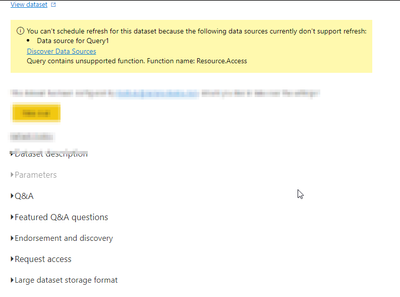
Query contains unsupported function. Function name: Resource.Access

Hi Community,

I have a report with multiple queries and it has been working fine since yesterday. But, suddenly throwing this error "Query contains unsupported function. Function name: Resource.Access"


I have checked the data sources and everything looks good, and the tables/queries are refreshing without any errors in the Desktop version. However, the problem with the Power BI Service. The Data source credentials and Scheduled Refresh options are not available and the report is getting failed.


rocky09_0-1670336412688.png


Additional Information:

Sources included in the report:  Oracle, SQL, and Python


1 ACCEPTED SOLUTION
Anonymous
Not applicable

Hi @rocky09 ,

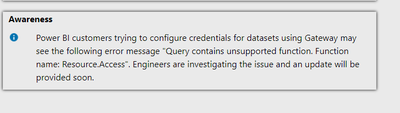
take a look at this support website of microsoft power bi, there is a message telling about this issue!

Support | Microsoft Power BI


vpollymsft_0-1670394275802.png

Engineers are investigating the issue and an update will be provided soon.


Best Regards
Community Support Team _ Polly

If this post helps, then please consider Accept it as the solution to help the other members find it more quickly.

View solution in original post

4 REPLIES 4
Syndicate_Admin
Administrator
Administrator

I have the same problem everything worked well and from one moment to another I send myself

Antonio_Bi2022_0-1670521675842.png

and then on the web I put this

Antonio_Bi2022_1-1670521738524.png

What needs to be done to fix it since it does not even give you the opportunity to place a gateway in case that was the reason.

Hopefully they can help themselves.

Thanks and regards.

Anonymous
Not applicable

Hi @rocky09 ,

take a look at this support website of microsoft power bi, there is a message telling about this issue!

Support | Microsoft Power BI


vpollymsft_0-1670394275802.png

Engineers are investigating the issue and an update will be provided soon.


Best Regards
Community Support Team _ Polly

If this post helps, then please consider Accept it as the solution to help the other members find it more quickly.

djurecic
Super User
Super User

Thank you for your reply. I have already referred the link you have shared and my issue is not resolved.

Helpful resources

Announcements
Join our Fabric User Panel

Join our Fabric User Panel

Share feedback directly with Fabric product managers, participate in targeted research studies and influence the Fabric roadmap.

February Power BI Update Carousel

Power BI Monthly Update - February 2026

Check out the February 2026 Power BI update to learn about new features.

FabCon Atlanta 2026 carousel

FabCon Atlanta 2026

Join us at FabCon Atlanta, March 16-20, for the ultimate Fabric, Power BI, AI and SQL community-led event. Save $200 with code FABCOMM.