Get certified for free when you join Fabric Data Days 2026 and dive into Fabric, Power BI, SQL, AI, and other essential data skills.
Join nowJuly 7 - July 17 | Round 2 of the Power BI Dataviz World Championships. Don't miss your chance! Learn more
So I have a lookup table in Query Editor that would be structured as follows:
ID Column: Index Column:
1003 1
2004 76
4543 98
3431 231
I have an original table that has index values from 1-250. What I want to do is do a lookup from the original table into the lookup table. So in rows 1-75 in the original table I want to bring in the corresponding ID from the lookup table. So rows 1-75 would return 1003, then rows 76-97 would return 2004, 98-230 would return 4543, and greater than 231 would return 3431. Is there an easy way to do this?
The other way I was thinking is to somehow dynamically add rows in between the index rows in my lookup table. So somehow add rows 2-97 between the first two rows on my lookup table. So then I would have rows 1-231 and then the corresponding ID number. Then it would be a simple lookup from the original table into this table.
Solved! Go to Solution.
I did the method to add rows to your table. Paste this code into a blank query in Power Query - get rid of the misc. text a Blank Query starts with.
let
Source = Table.FromRows(Json.Document(Binary.Decompress(Binary.FromText("i45WMjQwMFbSUTJUitWJVjIyMDABcszNwDwTUxOQlKUFmGdsYmwI5BkBydhYAA==", BinaryEncoding.Base64), Compression.Deflate)), let _t = ((type text) meta [Serialized.Text = true]) in type table [#"D Column:" = _t, #"Index Column:" = _t]),
#"Changed Type" = Table.TransformColumnTypes(Source,{{"D Column:", Int64.Type}, {"Index Column:", Int64.Type}}),
#"Added Index" = Table.AddIndexColumn(#"Changed Type", "Index", 0, 1),
#"Added Index1" = Table.AddIndexColumn(#"Added Index", "Index.1", 1, 1),
#"Merged Queries" = Table.NestedJoin(#"Added Index1", {"Index.1"}, #"Added Index1", {"Index"}, "Added Index1", JoinKind.LeftOuter),
#"Expanded Added Index1" = Table.ExpandTableColumn(#"Merged Queries", "Added Index1", {"Index Column:"}, {"Index Column:.1"}),
#"Added New Index" = Table.AddColumn(#"Expanded Added Index1", "New Index", each if [#"Index Column:.1"] <> null
then {[#"Index Column:"] .. [#"Index Column:.1"] - 1}
else {[#"Index Column:"] }),
#"Expanded List Data" = Table.ExpandListColumn(#"Added New Index", "New Index"),
#"Changed Type1" = Table.TransformColumnTypes(#"Expanded List Data",{{"New Index", Int64.Type}}),
#"Removed Other Columns" = Table.SelectColumns(#"Changed Type1",{"D Column:", "New Index"})
in
#"Removed Other Columns"
What this does is:
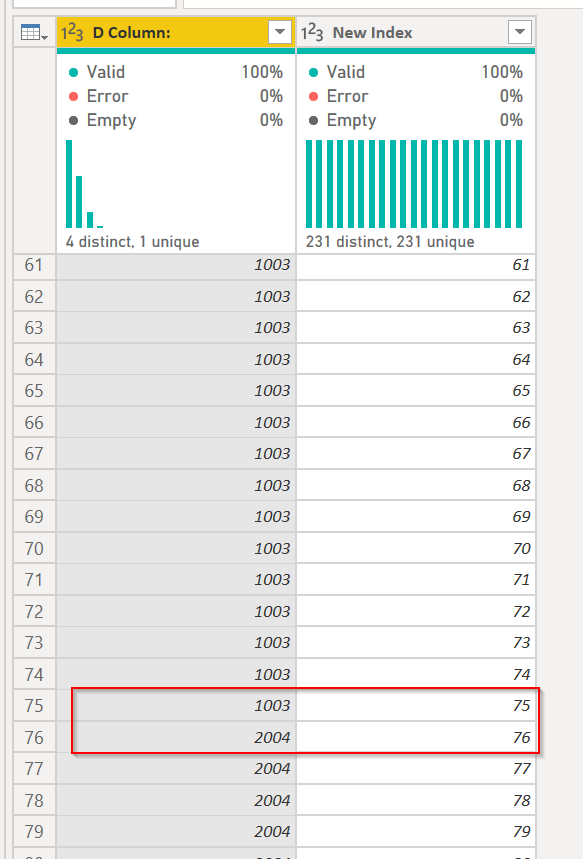
You can see that at 75, item 1003 stops numbering, and item 2004 pics up with 76...
DAX is for Analysis. Power Query is for Data Modeling
Proud to be a Super User!
MCSA: BI ReportingI did the method to add rows to your table. Paste this code into a blank query in Power Query - get rid of the misc. text a Blank Query starts with.
let
Source = Table.FromRows(Json.Document(Binary.Decompress(Binary.FromText("i45WMjQwMFbSUTJUitWJVjIyMDABcszNwDwTUxOQlKUFmGdsYmwI5BkBydhYAA==", BinaryEncoding.Base64), Compression.Deflate)), let _t = ((type text) meta [Serialized.Text = true]) in type table [#"D Column:" = _t, #"Index Column:" = _t]),
#"Changed Type" = Table.TransformColumnTypes(Source,{{"D Column:", Int64.Type}, {"Index Column:", Int64.Type}}),
#"Added Index" = Table.AddIndexColumn(#"Changed Type", "Index", 0, 1),
#"Added Index1" = Table.AddIndexColumn(#"Added Index", "Index.1", 1, 1),
#"Merged Queries" = Table.NestedJoin(#"Added Index1", {"Index.1"}, #"Added Index1", {"Index"}, "Added Index1", JoinKind.LeftOuter),
#"Expanded Added Index1" = Table.ExpandTableColumn(#"Merged Queries", "Added Index1", {"Index Column:"}, {"Index Column:.1"}),
#"Added New Index" = Table.AddColumn(#"Expanded Added Index1", "New Index", each if [#"Index Column:.1"] <> null
then {[#"Index Column:"] .. [#"Index Column:.1"] - 1}
else {[#"Index Column:"] }),
#"Expanded List Data" = Table.ExpandListColumn(#"Added New Index", "New Index"),
#"Changed Type1" = Table.TransformColumnTypes(#"Expanded List Data",{{"New Index", Int64.Type}}),
#"Removed Other Columns" = Table.SelectColumns(#"Changed Type1",{"D Column:", "New Index"})
in
#"Removed Other Columns"
What this does is:
You can see that at 75, item 1003 stops numbering, and item 2004 pics up with 76...
DAX is for Analysis. Power Query is for Data Modeling
Proud to be a Super User!
MCSA: BI ReportingSo @ImkeF or @edhans can probably assist.
| User | Count |
|---|---|
| 23 | |
| 21 | |
| 20 | |
| 20 | |
| 11 |
| User | Count |
|---|---|
| 62 | |
| 55 | |
| 47 | |
| 44 | |
| 37 |