Don't miss your chance to take the Fabric Data Engineer (DP-600) exam for FREE! Find out how by attending the DP-600 session on April 23rd (pacific time), live or on-demand.
Learn moreNext up in the FabCon + SQLCon recap series: The roadmap for Microsoft SQL and Maximizing Developer experiences in Fabric. All sessions are available on-demand after the live show. Register now
So I have a lookup table in Query Editor that would be structured as follows:
ID Column: Index Column:
1003 1
2004 76
4543 98
3431 231
I have an original table that has index values from 1-250. What I want to do is do a lookup from the original table into the lookup table. So in rows 1-75 in the original table I want to bring in the corresponding ID from the lookup table. So rows 1-75 would return 1003, then rows 76-97 would return 2004, 98-230 would return 4543, and greater than 231 would return 3431. Is there an easy way to do this?
The other way I was thinking is to somehow dynamically add rows in between the index rows in my lookup table. So somehow add rows 2-97 between the first two rows on my lookup table. So then I would have rows 1-231 and then the corresponding ID number. Then it would be a simple lookup from the original table into this table.
Solved! Go to Solution.
I did the method to add rows to your table. Paste this code into a blank query in Power Query - get rid of the misc. text a Blank Query starts with.
let
Source = Table.FromRows(Json.Document(Binary.Decompress(Binary.FromText("i45WMjQwMFbSUTJUitWJVjIyMDABcszNwDwTUxOQlKUFmGdsYmwI5BkBydhYAA==", BinaryEncoding.Base64), Compression.Deflate)), let _t = ((type text) meta [Serialized.Text = true]) in type table [#"D Column:" = _t, #"Index Column:" = _t]),
#"Changed Type" = Table.TransformColumnTypes(Source,{{"D Column:", Int64.Type}, {"Index Column:", Int64.Type}}),
#"Added Index" = Table.AddIndexColumn(#"Changed Type", "Index", 0, 1),
#"Added Index1" = Table.AddIndexColumn(#"Added Index", "Index.1", 1, 1),
#"Merged Queries" = Table.NestedJoin(#"Added Index1", {"Index.1"}, #"Added Index1", {"Index"}, "Added Index1", JoinKind.LeftOuter),
#"Expanded Added Index1" = Table.ExpandTableColumn(#"Merged Queries", "Added Index1", {"Index Column:"}, {"Index Column:.1"}),
#"Added New Index" = Table.AddColumn(#"Expanded Added Index1", "New Index", each if [#"Index Column:.1"] <> null
then {[#"Index Column:"] .. [#"Index Column:.1"] - 1}
else {[#"Index Column:"] }),
#"Expanded List Data" = Table.ExpandListColumn(#"Added New Index", "New Index"),
#"Changed Type1" = Table.TransformColumnTypes(#"Expanded List Data",{{"New Index", Int64.Type}}),
#"Removed Other Columns" = Table.SelectColumns(#"Changed Type1",{"D Column:", "New Index"})
in
#"Removed Other Columns"
What this does is:
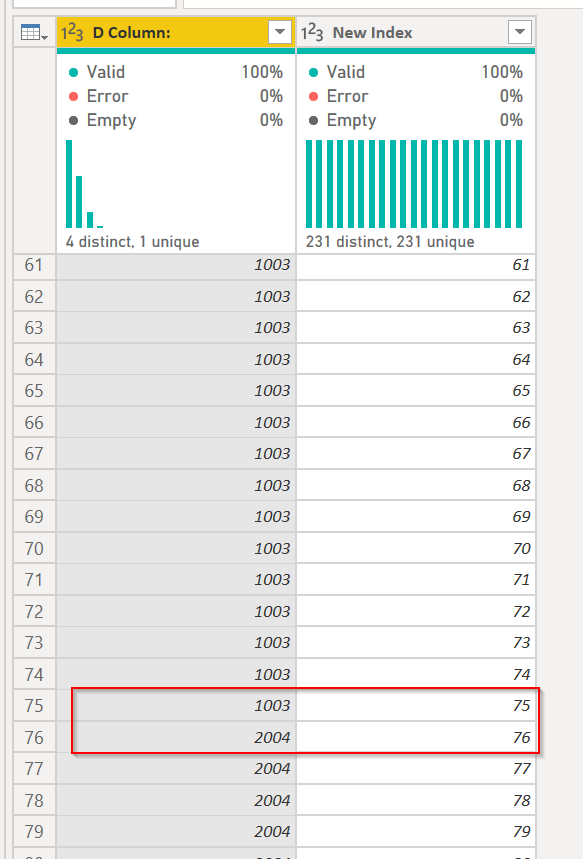
You can see that at 75, item 1003 stops numbering, and item 2004 pics up with 76...
DAX is for Analysis. Power Query is for Data Modeling
Proud to be a Super User!
MCSA: BI ReportingI did the method to add rows to your table. Paste this code into a blank query in Power Query - get rid of the misc. text a Blank Query starts with.
let
Source = Table.FromRows(Json.Document(Binary.Decompress(Binary.FromText("i45WMjQwMFbSUTJUitWJVjIyMDABcszNwDwTUxOQlKUFmGdsYmwI5BkBydhYAA==", BinaryEncoding.Base64), Compression.Deflate)), let _t = ((type text) meta [Serialized.Text = true]) in type table [#"D Column:" = _t, #"Index Column:" = _t]),
#"Changed Type" = Table.TransformColumnTypes(Source,{{"D Column:", Int64.Type}, {"Index Column:", Int64.Type}}),
#"Added Index" = Table.AddIndexColumn(#"Changed Type", "Index", 0, 1),
#"Added Index1" = Table.AddIndexColumn(#"Added Index", "Index.1", 1, 1),
#"Merged Queries" = Table.NestedJoin(#"Added Index1", {"Index.1"}, #"Added Index1", {"Index"}, "Added Index1", JoinKind.LeftOuter),
#"Expanded Added Index1" = Table.ExpandTableColumn(#"Merged Queries", "Added Index1", {"Index Column:"}, {"Index Column:.1"}),
#"Added New Index" = Table.AddColumn(#"Expanded Added Index1", "New Index", each if [#"Index Column:.1"] <> null
then {[#"Index Column:"] .. [#"Index Column:.1"] - 1}
else {[#"Index Column:"] }),
#"Expanded List Data" = Table.ExpandListColumn(#"Added New Index", "New Index"),
#"Changed Type1" = Table.TransformColumnTypes(#"Expanded List Data",{{"New Index", Int64.Type}}),
#"Removed Other Columns" = Table.SelectColumns(#"Changed Type1",{"D Column:", "New Index"})
in
#"Removed Other Columns"
What this does is:
You can see that at 75, item 1003 stops numbering, and item 2004 pics up with 76...
DAX is for Analysis. Power Query is for Data Modeling
Proud to be a Super User!
MCSA: BI ReportingSo @ImkeF or @edhans can probably assist.
If you have recently started exploring Fabric, we'd love to hear how it's going. Your feedback can help with product improvements.
A new Power BI DataViz World Championship is coming this June! Don't miss out on submitting your entry.
Share feedback directly with Fabric product managers, participate in targeted research studies and influence the Fabric roadmap.
| User | Count |
|---|---|
| 44 | |
| 43 | |
| 38 | |
| 18 | |
| 16 |
| User | Count |
|---|---|
| 67 | |
| 63 | |
| 30 | |
| 30 | |
| 23 |