Get certified for free when you join Fabric Data Days 2026 and dive into Fabric, Power BI, SQL, AI, and other essential data skills.
Join nowTry your skills in the Power BI Dataviz World Championship! Round one ends June 26. Join now
Solved! Go to Solution.
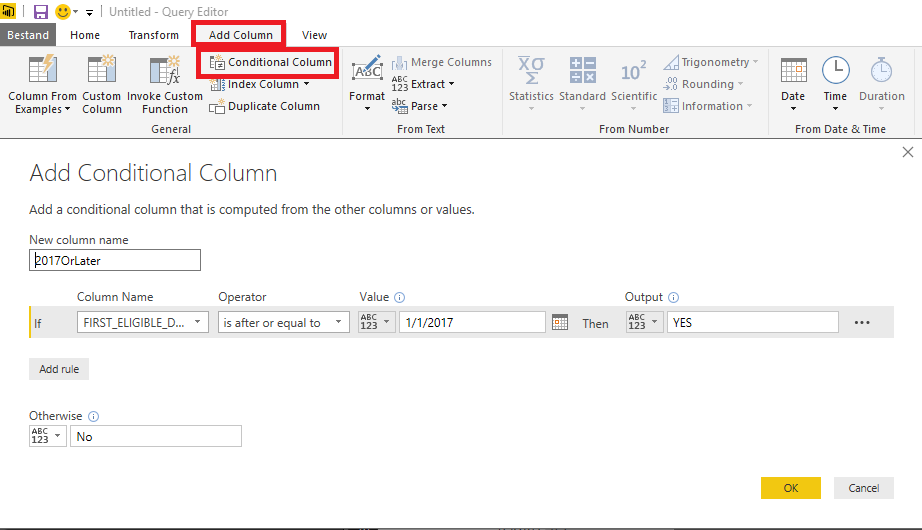
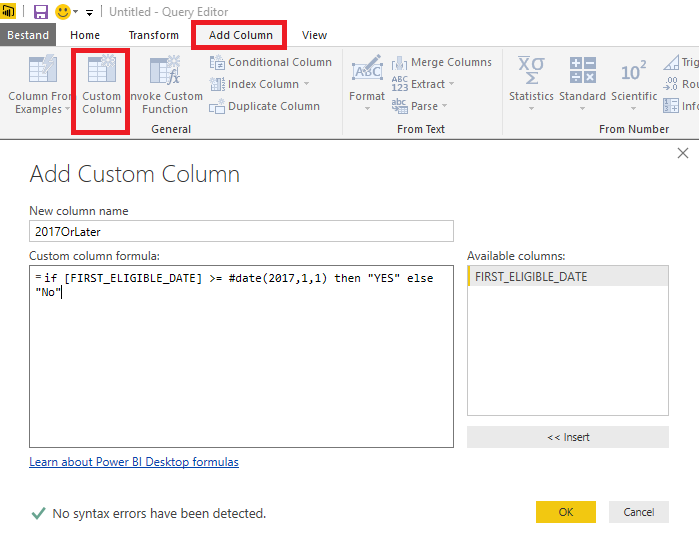
So you are in the Query Editor and you want to add a column with "YES" if FIRST_ELIGIBLE_DATE is on or afetr January 1, 2017 and "No" if it is not.
You can either add a conditional column and fill out the fields or add a custom column and enter the formula.
In either case, the generated code in the advanced editor will look like:
#"Added Custom" = Table.AddColumn(#"Renamed Columns", "2017OrLater", each if [FIRST_ELIGIBLE_DATE] >= #date(2017,1,1) then "YES" else "No")
Thank you MarcelBeug, it works now. It was the case sensitive got me, #Date should be #date.
So you are in the Query Editor and you want to add a column with "YES" if FIRST_ELIGIBLE_DATE is on or afetr January 1, 2017 and "No" if it is not.
You can either add a conditional column and fill out the fields or add a custom column and enter the formula.
In either case, the generated code in the advanced editor will look like:
#"Added Custom" = Table.AddColumn(#"Renamed Columns", "2017OrLater", each if [FIRST_ELIGIBLE_DATE] >= #date(2017,1,1) then "YES" else "No")
Thank you MarcelBeug, it works now. It was the case sensitive got me, #Date should be #date.
| User | Count |
|---|---|
| 23 | |
| 21 | |
| 21 | |
| 17 | |
| 11 |
| User | Count |
|---|---|
| 58 | |
| 55 | |
| 43 | |
| 36 | |
| 35 |