cancel
Showing results for 
Search instead for 
Did you mean: 

The Power BI Data Visualization World Championships is back! Get ahead of the game and start preparing now! Learn more

Reply
Lifan
Frequent Visitor

Query Editor - Custom Column date formula

Hi, Need help please. In the Query Editor, I just want to create a custom column using date formula. From my research, I'm supposed to use M Functions to compose it. And the #Date is function I'm trying to use but receiving error. if [FIRST_ELIGIBLE_DATE] >= #Date(2017,1,1) then YES else No Could anyone advise which part went wrong? Thanks!
2 ACCEPTED SOLUTIONS
MarcelBeug
Community Champion
Community Champion

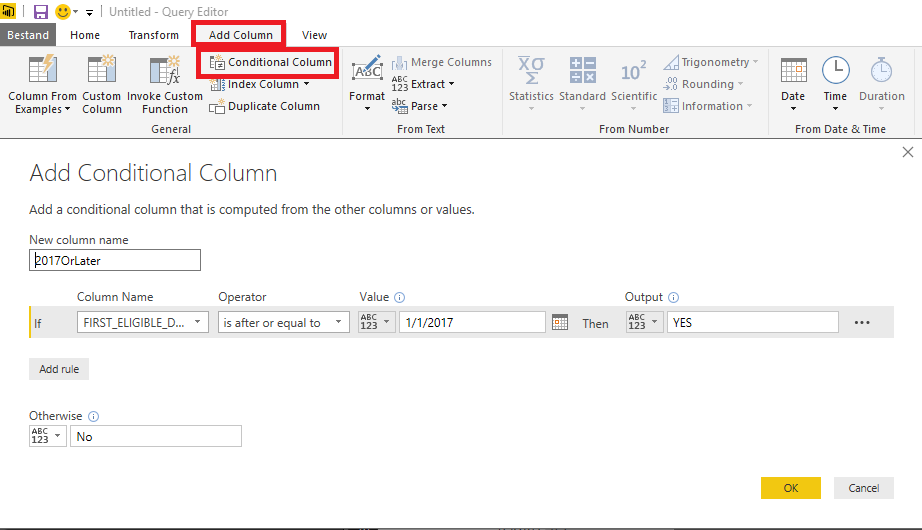
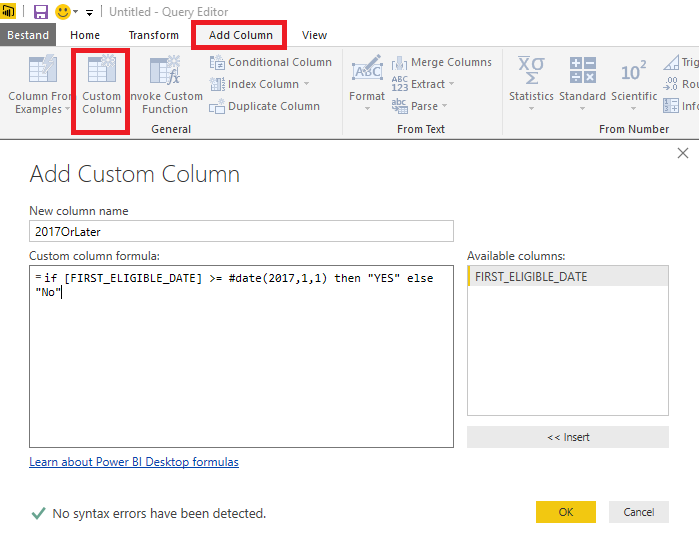
So you are in the Query Editor and you want to add a column with "YES" if FIRST_ELIGIBLE_DATE is on or afetr January 1, 2017 and "No" if it is not.


You can either add a conditional column and fill out the fields or add a custom column and enter the formula.


In either case, the generated code in the advanced editor will look like:


    #"Added Custom" = Table.AddColumn(#"Renamed Columns", "2017OrLater", each if [FIRST_ELIGIBLE_DATE] >= #date(2017,1,1) then "YES" else "No")


Add conditional column.pngAdd Custom column.png

Specializing in Power Query Formula Language (M)

View solution in original post

Thank you MarcelBeug, it works now. It was the case sensitive got me, #Date should be #date.

View solution in original post

2 REPLIES 2
MarcelBeug
Community Champion
Community Champion

So you are in the Query Editor and you want to add a column with "YES" if FIRST_ELIGIBLE_DATE is on or afetr January 1, 2017 and "No" if it is not.


You can either add a conditional column and fill out the fields or add a custom column and enter the formula.


In either case, the generated code in the advanced editor will look like:


    #"Added Custom" = Table.AddColumn(#"Renamed Columns", "2017OrLater", each if [FIRST_ELIGIBLE_DATE] >= #date(2017,1,1) then "YES" else "No")


Add conditional column.pngAdd Custom column.png

Specializing in Power Query Formula Language (M)

Thank you MarcelBeug, it works now. It was the case sensitive got me, #Date should be #date.

Helpful resources

Announcements
Power BI DataViz World Championships

Power BI Dataviz World Championships

The Power BI Data Visualization World Championships is back! Get ahead of the game and start preparing now!

December 2025 Power BI Update Carousel

Power BI Monthly Update - December 2025

Check out the December 2025 Power BI Holiday Recap!

FabCon Atlanta 2026 carousel

FabCon Atlanta 2026

Join us at FabCon Atlanta, March 16-20, for the ultimate Fabric, Power BI, AI and SQL community-led event. Save $200 with code FABCOMM.