Share feedback directly with Fabric product managers, participate in targeted research studies and influence the Fabric roadmap.
Sign up nowGet Fabric certified for FREE! Don't miss your chance! Learn more
Solved! Go to Solution.
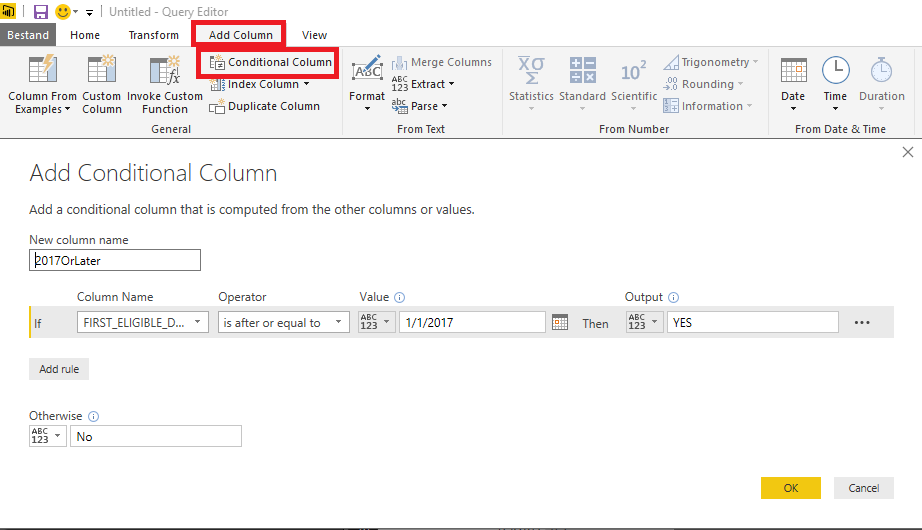
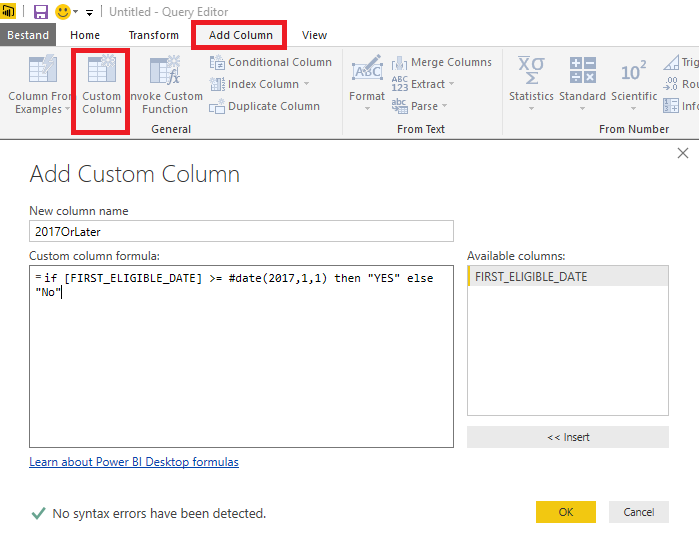
So you are in the Query Editor and you want to add a column with "YES" if FIRST_ELIGIBLE_DATE is on or afetr January 1, 2017 and "No" if it is not.
You can either add a conditional column and fill out the fields or add a custom column and enter the formula.
In either case, the generated code in the advanced editor will look like:
#"Added Custom" = Table.AddColumn(#"Renamed Columns", "2017OrLater", each if [FIRST_ELIGIBLE_DATE] >= #date(2017,1,1) then "YES" else "No")
Thank you MarcelBeug, it works now. It was the case sensitive got me, #Date should be #date.
So you are in the Query Editor and you want to add a column with "YES" if FIRST_ELIGIBLE_DATE is on or afetr January 1, 2017 and "No" if it is not.
You can either add a conditional column and fill out the fields or add a custom column and enter the formula.
In either case, the generated code in the advanced editor will look like:
#"Added Custom" = Table.AddColumn(#"Renamed Columns", "2017OrLater", each if [FIRST_ELIGIBLE_DATE] >= #date(2017,1,1) then "YES" else "No")
Thank you MarcelBeug, it works now. It was the case sensitive got me, #Date should be #date.
Share feedback directly with Fabric product managers, participate in targeted research studies and influence the Fabric roadmap.
| User | Count |
|---|---|
| 63 | |
| 62 | |
| 42 | |
| 19 | |
| 16 |
| User | Count |
|---|---|
| 111 | |
| 105 | |
| 36 | |
| 28 | |
| 27 |