cancel
Showing results for 
Search instead for 
Did you mean: 

July 7 - July 17 | Round 2 of the Power BI Dataviz World Championships. Don't miss your chance! Learn more

Reply
clem312
Resolver I
Resolver I

Quadrant graph

Hi everyone,


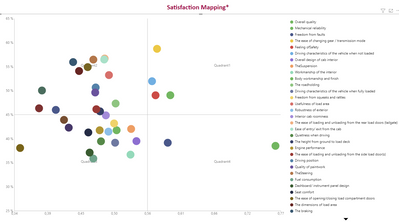
I made a quadrant chart but I would the labels to be in the graph instead of at the top, bottom or left/right.

As it's done in the Gartner quadrant.

Any idea ?

clem312_0-1634290316417.png


1 ACCEPTED SOLUTION
clem312
Resolver I
Resolver I

If anyone is interested, the best way to make a quadrant with labels in it is using Bubble / Scatter chart from xwiz.

View solution in original post

3 REPLIES 3
clem312
Resolver I
Resolver I

If anyone is interested, the best way to make a quadrant with labels in it is using Bubble / Scatter chart from xwiz.

PaulDBrown
Community Champion
Community Champion

You could add shapes with text and place them at the back (under formatting) and make the chart's backround transparent. The only problem is that the texts will not be visible in focus mode.

Another possibility is to explore Charticulator:

https://charticulator.com/ 


Did I answer your question? Mark my post as a solution!
In doing so, you are also helping me. Thank you!

Proud to be a Super User!
Paul on Linkedin.


Hi @PaulDBrown 


Thank you but it doesn't seem that charticulator is able to make Quadrant.

Helpful resources

Announcements
FabCon and SQLCon Barcelona 2026

FabCon & SQLCon – Barcelona 2026

Join us in Barcelona for FabCon and SQLCon, the Fabric, Power BI, SQL, and AI community event. Save €200 with code FABCMTY200.

60 days of Data Days Carousel

Data Days 2026

Join Data Days 2026: 60 days of free live/on-demand sessions, challenges, study groups, and certification opportunities.

Power BI DataViz World Championships carousel

Power BI DataViz World Championships - June 2026

A new Power BI DataViz World Championship is coming this June! Don't miss out on submitting your entry.

Top Solution Authors