cancel
Showing results for 
Search instead for 
Did you mean: 

View all the Fabric Data Days sessions on demand. View schedule

Reply
clem312
Resolver I
Resolver I

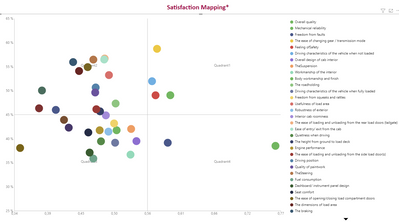
Quadrant graph

Hi everyone,


I made a quadrant chart but I would the labels to be in the graph instead of at the top, bottom or left/right.

As it's done in the Gartner quadrant.

Any idea ?

clem312_0-1634290316417.png


1 ACCEPTED SOLUTION
clem312
Resolver I
Resolver I

If anyone is interested, the best way to make a quadrant with labels in it is using Bubble / Scatter chart from xwiz.

View solution in original post

3 REPLIES 3
clem312
Resolver I
Resolver I

If anyone is interested, the best way to make a quadrant with labels in it is using Bubble / Scatter chart from xwiz.

PaulDBrown
Community Champion
Community Champion

You could add shapes with text and place them at the back (under formatting) and make the chart's backround transparent. The only problem is that the texts will not be visible in focus mode.

Another possibility is to explore Charticulator:

https://charticulator.com/ 


Did I answer your question? Mark my post as a solution!
In doing so, you are also helping me. Thank you!

Proud to be a Super User!
Paul on Linkedin.


Hi @PaulDBrown 


Thank you but it doesn't seem that charticulator is able to make Quadrant.

Helpful resources

Announcements
November Power BI Update Carousel

Power BI Monthly Update - November 2025

Check out the November 2025 Power BI update to learn about new features.

Fabric Data Days Carousel

Fabric Data Days

Advance your Data & AI career with 50 days of live learning, contests, hands-on challenges, study groups & certifications and more!

FabCon Atlanta 2026 carousel

FabCon Atlanta 2026

Join us at FabCon Atlanta, March 16-20, for the ultimate Fabric, Power BI, AI and SQL community-led event. Save $200 with code FABCOMM.

Top Solution Authors
Top Kudoed Authors