Join us at FabCon Atlanta from March 16 - 20, 2026, for the ultimate Fabric, Power BI, AI and SQL community-led event. Save $200 with code FABCOMM.
Register now!The Power BI Data Visualization World Championships is back! Get ahead of the game and start preparing now! Learn more
Hi Power BI community,
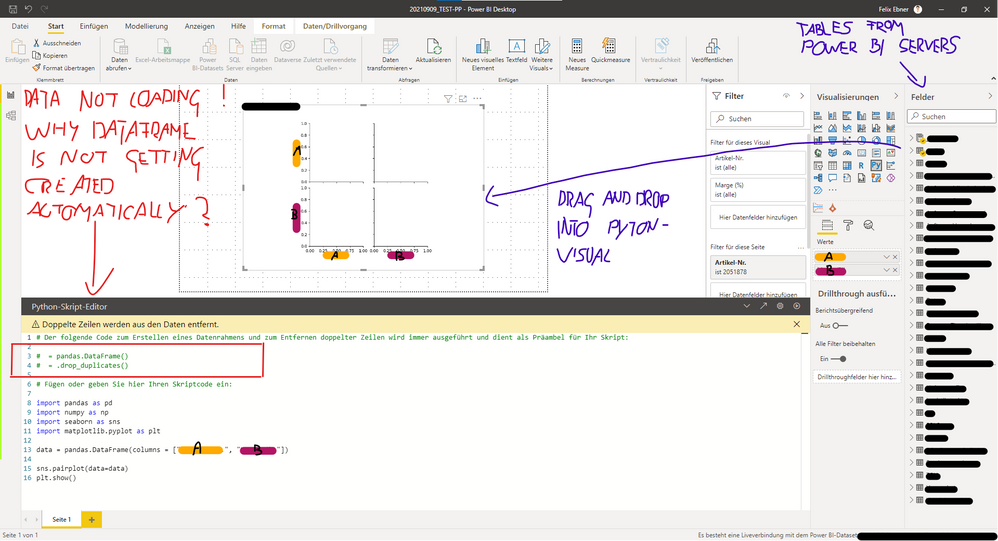
I need your help. I am trying to create a Python visual in Power BI Desktop; the code works fine, but the visual doesn't load the data from the data model into the dataframe. Therefore the graphs remain empty.
It's really frustrating...
You'll find an example - screenshot - down below.
(Excuse the child's painting)
Some background information:
Could it be that there a limitations when using a pre build Power BI-Dataset?
- Maybe it's my limited access
I would be extremely thankful if someone has a clue or solution for this problem!
Thanks in advance.
Best regards,
Felix
You may have filters on your Values A and B that result in an empty dataframe? Hard to tell without more context.
@lbendlin Thanks for your Input.
I think I know the reason; it seems that it has something to do with the Power BI dataset from my employer. Maybe some sort of restricions. (I have limited access to the dataset. I can use it, but can't make any changes. Can't even use the power query editor)
I tried it with data from an Excel sheet and the Python visual worked perfectly fine.
Possible Solutions:
A - I need to find a workaround, to exctract the data from the system and import it into Power BI
B - I need to get some special authorization / access to the dataset (Which is highly unlikely)
Any other ideas are welcome 🙏
Best,
Felix
@Anonymous You are supposed to use the prefilled "dataset" dataframe, not fill your own.
@lbendlin I know. That's the point of my question, the "prefilled dataset dataframe" is not loading by itself. Any idea what's the reason?
Best,
Felix
The Power BI Data Visualization World Championships is back! Get ahead of the game and start preparing now!
| User | Count |
|---|---|
| 161 | |
| 132 | |
| 117 | |
| 79 | |
| 53 |