Join us at FabCon Atlanta from March 16 - 20, 2026, for the ultimate Fabric, Power BI, AI and SQL community-led event. Save $200 with code FABCOMM.
Register now!The Power BI Data Visualization World Championships is back! It's time to submit your entry. Live now!
Hi Power BI community,
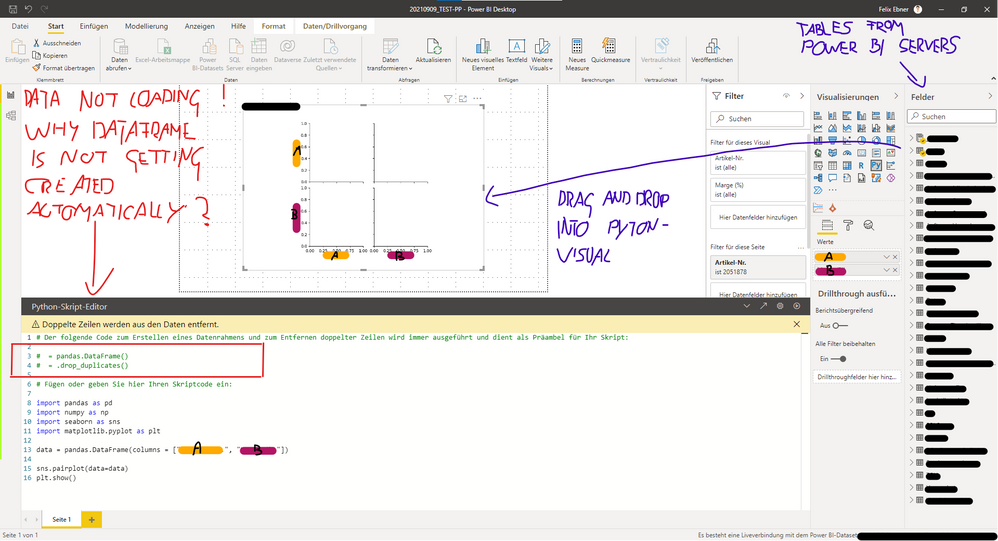
I need your help. I am trying to create a Python visual in Power BI Desktop; the code works fine, but the visual doesn't load the data from the data model into the dataframe. Therefore the graphs remain empty.
It's really frustrating...
You'll find an example - screenshot - down below.
(Excuse the child's painting)
Some background information:
Could it be that there a limitations when using a pre build Power BI-Dataset?
- Maybe it's my limited access
I would be extremely thankful if someone has a clue or solution for this problem!
Thanks in advance.
Best regards,
Felix
You may have filters on your Values A and B that result in an empty dataframe? Hard to tell without more context.
@lbendlin Thanks for your Input.
I think I know the reason; it seems that it has something to do with the Power BI dataset from my employer. Maybe some sort of restricions. (I have limited access to the dataset. I can use it, but can't make any changes. Can't even use the power query editor)
I tried it with data from an Excel sheet and the Python visual worked perfectly fine.
Possible Solutions:
A - I need to find a workaround, to exctract the data from the system and import it into Power BI
B - I need to get some special authorization / access to the dataset (Which is highly unlikely)
Any other ideas are welcome 🙏
Best,
Felix
@Anonymous You are supposed to use the prefilled "dataset" dataframe, not fill your own.
@lbendlin I know. That's the point of my question, the "prefilled dataset dataframe" is not loading by itself. Any idea what's the reason?
Best,
Felix
| User | Count |
|---|---|
| 53 | |
| 40 | |
| 35 | |
| 24 | |
| 22 |
| User | Count |
|---|---|
| 136 | |
| 111 | |
| 58 | |
| 43 | |
| 38 |