Don't miss your chance to take the Fabric Data Engineer (DP-600) exam for FREE! Find out how by attending the DP-600 session on April 23rd (pacific time), live or on-demand.
Learn moreNext up in the FabCon + SQLCon recap series: The roadmap for Microsoft SQL and Maximizing Developer experiences in Fabric. All sessions are available on-demand after the live show. Register now
I am editing data in Power Query
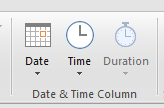
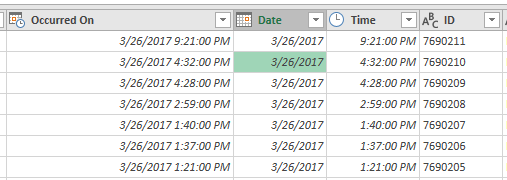
Parsed "Occurred On" into Date and Time. Can you tell me how I would use "Duration".
Solved! Go to Solution.
Hi @QQQ,
I think you can take a look at bleow links which about duration.
Reference:
| Function | Description |
|---|---|
| Duration.Days | Returns the day component of a Duration value. |
| Duration.From | Returns a duration value from a value. |
| Duration.FromText | Returns a Duration value from a text value. |
| Duration.Hours | Returns an hour component of a Duration value. |
| Duration.Minutes | Returns a minute component of a Duration value. |
| Duration.Seconds | Returns a second component of a Duration value. |
| Duration.ToRecord | Returns a record with parts of a Duration value. |
| Duration.TotalDays | Returns the total magnitude of days from a Duration value. |
| Duration.TotalHours | Returns the total magnitude of hours from a Duration value. |
| Duration.TotalMinutes | Returns the total magnitude of minutes from a Duration value. |
| Duration.TotalSeconds | Returns the total magnitude of seconds from a duration value. |
For instance:
Duration.Second([Datetime Column]) //get the second value(0~59) of datetime
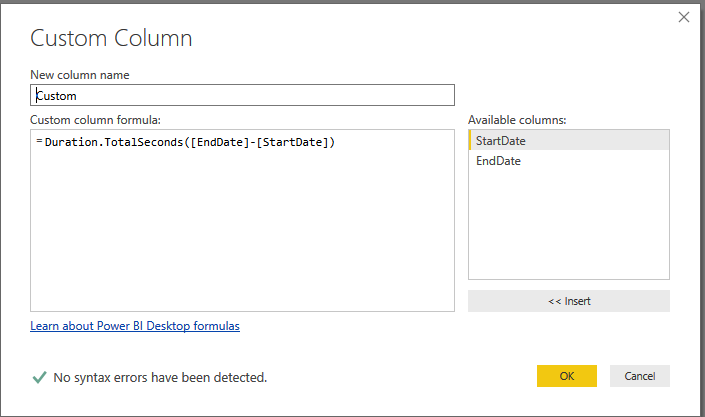
Duration.TotalSeconds([Datetime Column]) //convert datetime value to second
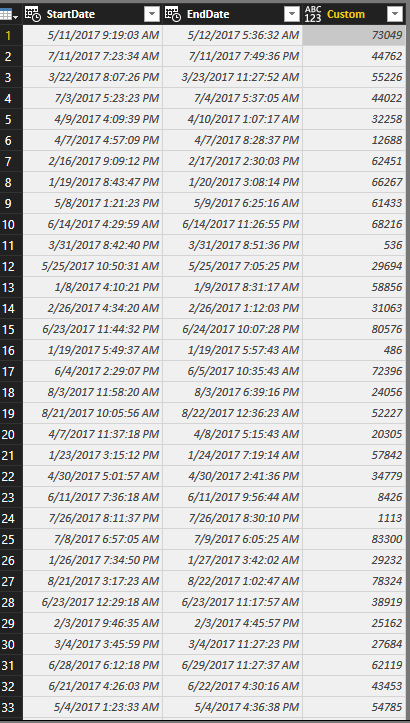
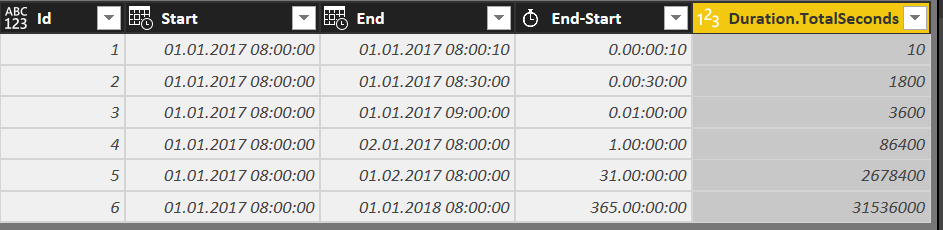
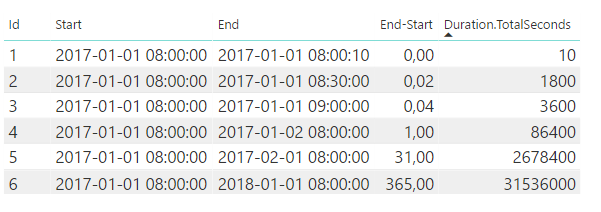
Sample: get the diff of date range and convert them to second.
Regards,
Xiaoxin Sheng
Hi @QQQ,
I think you can take a look at bleow links which about duration.
Reference:
| Function | Description |
|---|---|
| Duration.Days | Returns the day component of a Duration value. |
| Duration.From | Returns a duration value from a value. |
| Duration.FromText | Returns a Duration value from a text value. |
| Duration.Hours | Returns an hour component of a Duration value. |
| Duration.Minutes | Returns a minute component of a Duration value. |
| Duration.Seconds | Returns a second component of a Duration value. |
| Duration.ToRecord | Returns a record with parts of a Duration value. |
| Duration.TotalDays | Returns the total magnitude of days from a Duration value. |
| Duration.TotalHours | Returns the total magnitude of hours from a Duration value. |
| Duration.TotalMinutes | Returns the total magnitude of minutes from a Duration value. |
| Duration.TotalSeconds | Returns the total magnitude of seconds from a duration value. |
For instance:
Duration.Second([Datetime Column]) //get the second value(0~59) of datetime
Duration.TotalSeconds([Datetime Column]) //convert datetime value to second
Sample: get the diff of date range and convert them to second.
Regards,
Xiaoxin Sheng
Hello,
How can I change the "Custom" column from your example to a duration format like YY:MM:DD.HH:MM:SS?
My End-Start column is simply [End]-[Start].
Duration... is Duration.TotalSeconds([End]-[Start]).
I would like to get a column that looks like End-Start in the Query Editor, so sth like 1.15:20:30.
If I change the format of Duration... to "Time" I get an error "We can't automatically convert the column to Time type."
What should I do now?
Change the duration to text.
It does not change anything.
Another example in this topic in which "epoch" (seconds since 1/1/1970 0:00) is converted to UTC datetime and local date.
(In this example, epoch is a number in text format, that's why I used Number.From).
If you have recently started exploring Fabric, we'd love to hear how it's going. Your feedback can help with product improvements.
A new Power BI DataViz World Championship is coming this June! Don't miss out on submitting your entry.
Share feedback directly with Fabric product managers, participate in targeted research studies and influence the Fabric roadmap.
| User | Count |
|---|---|
| 48 | |
| 45 | |
| 41 | |
| 20 | |
| 17 |
| User | Count |
|---|---|
| 69 | |
| 63 | |
| 32 | |
| 31 | |
| 23 |