cancel
Showing results for 
Search instead for 
Did you mean: 

July 7 - July 17 | Round 2 of the Power BI Dataviz World Championships. Don't miss your chance! Learn more

Reply
abhijitsahay
Frequent Visitor

Published data source does not save credentials

I published a database connection as a data source from Power BI desktop.  The connection information and credentials are correct and I can create reports using it in the desktop. The publication is also successful, and the data source is visible in my workspace in app.powerbi.com.  But when I try to use it, there is a banner at the top saying "The data source xxxxx is missing credentials and cannot be accessed".  Does anyone know how to solve this problem?

1 ACCEPTED SOLUTION
amitchandak
Super User
Super User

@abhijitsahay , Click on the three dots of the dataset. Open settings. There you will see an option for data source credentials. Provide details there 

Share with Power BI Enthusiasts: Full Power BI Video (20 Hours) YouTube
Microsoft Fabric Series 60+ Videos YouTube
Microsoft Fabric Hindi End to End YouTube

View solution in original post

5 REPLIES 5
Retract7372
Regular Visitor

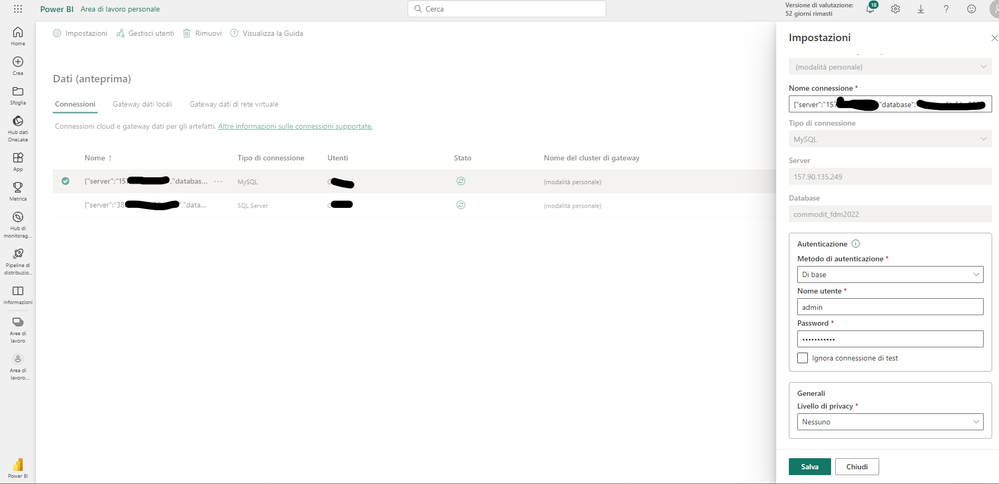
Good morning, I have the same problem, I enter the credentials but if I click "Save" (Salva) nothing happens.


Could you please help me?


screen.png

I'm having the same problem - @Retract7372 did you ever figure out how to get your credentials to save?

v-easonf-msft
Community Support
Community Support

Hi, @abhijitsahay 

In Power BI Desktop, you connected directly to your on-premises database, but the Power BI service requires a data gateway to act as a bridge between the cloud and your on-premises network. 

Please refer to the following steps to add your on-premises  database as a data source to a gateway and then connect your dataset to this data source.

1. Install an on-premises data gateway

2. Add data sources that can be used with the gateway Manage your data source - SQL Server 

3. Connect your dataset to this data source Connect a dataset to a SQL Server database 

Best Regards,
Community Support Team _ Eason

Hello, I have the following problem:

On some WEB connections (data files in Sharepoint) I can't save the credential settings.

AJG1979_0-1739371896891.png

How do I fix this problem?

With some connections it works correctly.

amitchandak
Super User
Super User

@abhijitsahay , Click on the three dots of the dataset. Open settings. There you will see an option for data source credentials. Provide details there 

Share with Power BI Enthusiasts: Full Power BI Video (20 Hours) YouTube
Microsoft Fabric Series 60+ Videos YouTube
Microsoft Fabric Hindi End to End YouTube

Helpful resources

Announcements
FabCon and SQLCon Barcelona 2026

FabCon & SQLCon – Barcelona 2026

Join us in Barcelona for FabCon and SQLCon, the Fabric, Power BI, SQL, and AI community event. Save €200 with code FABCMTY200.

60 days of Data Days Carousel

Data Days 2026

Join Data Days 2026: 60 days of free live/on-demand sessions, challenges, study groups, and certification opportunities.

Power BI DataViz World Championships carousel

Power BI DataViz World Championships - June 2026

A new Power BI DataViz World Championship is coming this June! Don't miss out on submitting your entry.

Top Solution Authors