Join us at FabCon Atlanta from March 16 - 20, 2026, for the ultimate Fabric, Power BI, AI and SQL community-led event. Save $200 with code FABCOMM.
Register now!The Power BI Data Visualization World Championships is back! It's time to submit your entry. Live now!
I published a database connection as a data source from Power BI desktop. The connection information and credentials are correct and I can create reports using it in the desktop. The publication is also successful, and the data source is visible in my workspace in app.powerbi.com. But when I try to use it, there is a banner at the top saying "The data source xxxxx is missing credentials and cannot be accessed". Does anyone know how to solve this problem?
Solved! Go to Solution.
@abhijitsahay , Click on the three dots of the dataset. Open settings. There you will see an option for data source credentials. Provide details there
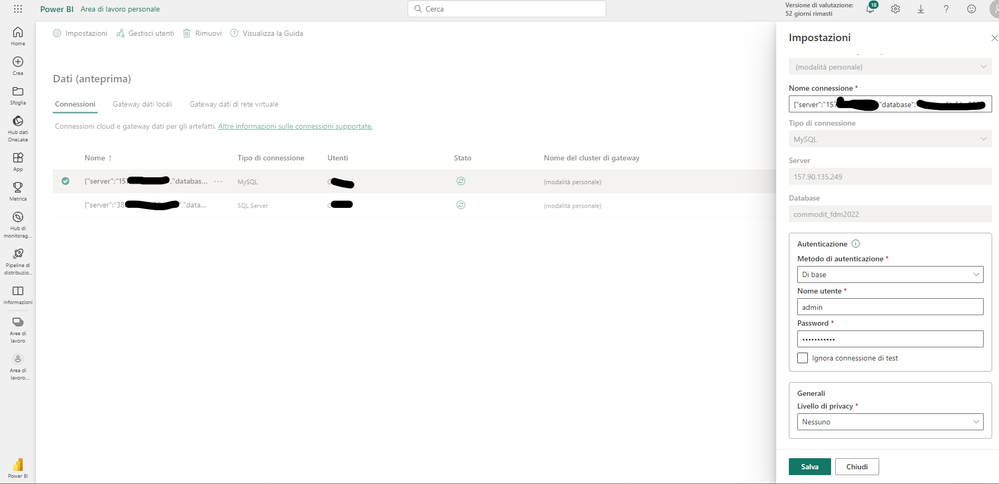
Good morning, I have the same problem, I enter the credentials but if I click "Save" (Salva) nothing happens.
Could you please help me?
I'm having the same problem - @Retract7372 did you ever figure out how to get your credentials to save?
Hi, @abhijitsahay
In Power BI Desktop, you connected directly to your on-premises database, but the Power BI service requires a data gateway to act as a bridge between the cloud and your on-premises network.
Please refer to the following steps to add your on-premises database as a data source to a gateway and then connect your dataset to this data source.
1. Install an on-premises data gateway
2. Add data sources that can be used with the gateway Manage your data source - SQL Server
3. Connect your dataset to this data source Connect a dataset to a SQL Server database
Best Regards,
Community Support Team _ Eason
Hello, I have the following problem:
On some WEB connections (data files in Sharepoint) I can't save the credential settings.
How do I fix this problem?
With some connections it works correctly.
@abhijitsahay , Click on the three dots of the dataset. Open settings. There you will see an option for data source credentials. Provide details there
| User | Count |
|---|---|
| 51 | |
| 38 | |
| 33 | |
| 22 | |
| 19 |
| User | Count |
|---|---|
| 136 | |
| 101 | |
| 58 | |
| 36 | |
| 35 |