Join us at FabCon Atlanta from March 16 - 20, 2026, for the ultimate Fabric, Power BI, AI and SQL community-led event. Save $200 with code FABCOMM.
Register now!The Power BI Data Visualization World Championships is back! Get ahead of the game and start preparing now! Learn more
I published a database connection as a data source from Power BI desktop. The connection information and credentials are correct and I can create reports using it in the desktop. The publication is also successful, and the data source is visible in my workspace in app.powerbi.com. But when I try to use it, there is a banner at the top saying "The data source xxxxx is missing credentials and cannot be accessed". Does anyone know how to solve this problem?
Solved! Go to Solution.
@abhijitsahay , Click on the three dots of the dataset. Open settings. There you will see an option for data source credentials. Provide details there
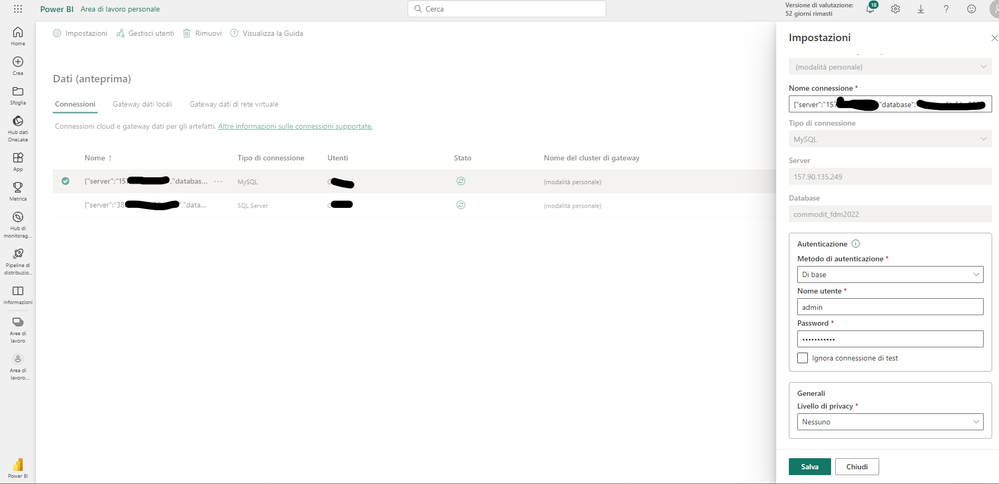
Good morning, I have the same problem, I enter the credentials but if I click "Save" (Salva) nothing happens.
Could you please help me?
I'm having the same problem - @Retract7372 did you ever figure out how to get your credentials to save?
Hi, @abhijitsahay
In Power BI Desktop, you connected directly to your on-premises database, but the Power BI service requires a data gateway to act as a bridge between the cloud and your on-premises network.
Please refer to the following steps to add your on-premises database as a data source to a gateway and then connect your dataset to this data source.
1. Install an on-premises data gateway
2. Add data sources that can be used with the gateway Manage your data source - SQL Server
3. Connect your dataset to this data source Connect a dataset to a SQL Server database
Best Regards,
Community Support Team _ Eason
Hello, I have the following problem:
On some WEB connections (data files in Sharepoint) I can't save the credential settings.
How do I fix this problem?
With some connections it works correctly.
@abhijitsahay , Click on the three dots of the dataset. Open settings. There you will see an option for data source credentials. Provide details there
The Power BI Data Visualization World Championships is back! Get ahead of the game and start preparing now!
Check out the November 2025 Power BI update to learn about new features.
| User | Count |
|---|---|
| 68 | |
| 46 | |
| 44 | |
| 29 | |
| 20 |
| User | Count |
|---|---|
| 202 | |
| 130 | |
| 102 | |
| 71 | |
| 55 |