We've captured the moments from FabCon & SQLCon that everyone is talking about, and we are bringing them to the community, live and on-demand. Starts on April 14th. Register now
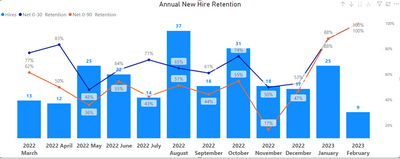
Hi I am looking to see if PowerBi has the capability to project future retention percentages based on previous 12 months retention. I am trying to forecast our employee retention rate for 2023. I'm not sure if I could create a measure to show this, or if it is even possible for PowerBi to forecast data. I have included a screenshot of the graph I currently have and would love to add a projection line to if possible. Thanks.
There may be a problem with the Y-axis measure you are using - trying replacing it with some other measures/ columns and see if it turns on.
If thats the case, then you may need to do the following with your Retention %:
1. instead of using a percentage - use actual numbers
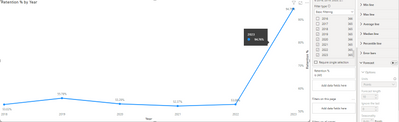
2. Try unfiltering the dates in this graph - the limited number of years may not be enough for the algorithm to figure out a forecastable trend
Yes its absolutely possible and easy.
The only caveat is that this can only be done on a single line chart - not the type that you have above.
1. Put your measure into single line chart -with a date formatted time column as the x-axis and your retention numbers as the y axis
2. In the visualisation analytics pane, chose the third icon (magnifying glass).
3. Second from last option - Forecast - turn on
Easy as that
Accept this as the solution if this is what you wanted
Thanks for your help. The problem I'm now having is that it will not allow me to turn forecast on. I try to change it from off and it won't turn on.
If you have recently started exploring Fabric, we'd love to hear how it's going. Your feedback can help with product improvements.
A new Power BI DataViz World Championship is coming this June! Don't miss out on submitting your entry.
Share feedback directly with Fabric product managers, participate in targeted research studies and influence the Fabric roadmap.
| User | Count |
|---|---|
| 57 | |
| 38 | |
| 33 | |
| 19 | |
| 16 |
| User | Count |
|---|---|
| 68 | |
| 66 | |
| 41 | |
| 34 | |
| 25 |