cancel
Showing results for 
Search instead for 
Did you mean: 

Try your skills in the Power BI Dataviz World Championship! Round one ends June 26. Join now

Reply
Anonymous
Not applicable

Project Summary Subtasks Matrix

I'm trying to use a matrix table to display projects, summary tasks and tasks in a drill down to expand and collapse at each level. 

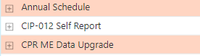
This is the project level from the project table.   

fm114fm_0-1659630607557.png


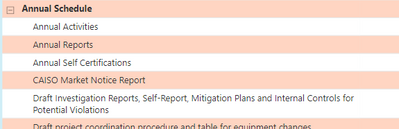
But when I expland the project, the summary tasks are at the same level of all tasks and sorted alphabetically.  Annual Activities is a summary task.  Yet, the listing give it me me as a task (see project image below this).


fm114fm_1-1659630607594.png


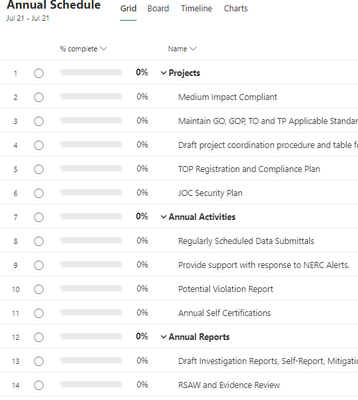
It should look like this. 


fm114fm_5-1659630790136.png


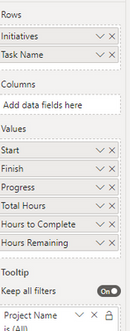
How can I get a matrix to look like the project.  Here is what I have (initiative is rename from Project Name)


fm114fm_3-1659630607668.png


1 ACCEPTED SOLUTION
Anonymous
Not applicable

Hi @Anonymous,

I'd like to suggest you create a table with all value field names and an index column to setting custom sort order.

Custom Sorting in Power BI – Power BI & Excel are better together (excelnaccess.com)
After these steps, you can use the new table filed on matrix column, then you can write a measruer formula to get the current field value to lookup raw table field values.

My Favorite DAX Feature: SELECTEDVALUE with SWITCH | Winston-Salem Power BI User Group (pbiusergroup...

Regards,

Xiaoxin Sheng

View solution in original post

4 REPLIES 4
SDM_1997
Helper II
Helper II

Hi, 
Need help regarding extracting Task Summary Names too.
How did you solve this issue?
I checked the answer marked as the solution but did not quite understand it.
I am using Microsoft Project Online to extract details. 
Currently, Power BI is extracting everything as a normal Task only.
Can you explain how did you highlight which Task names are Summary Tasks?

Thanks !! 

selimovd
Most Valuable Professional

Hey @Anonymous ,


you should be able to solve that with a sort by column for each column:

https://radacad.com/sort-by-column-in-power-bi


If you need any help please let me know.
If I answered your question I would be happy if you could mark my post as a solution ✔️ and give it a thumbs up 👍

Best regards
Denis

Blog: WhatTheFact.bi
Follow me: twitter.com/DenSelimovic

Anonymous
Not applicable

I can't seem to get that to work.   The template I'm using is from the Microsoft project dashboard download.  If you look above the project image (from the Annual Schedule projecy) has summary/subtasks.  The Task Name is from the Project Task Table.  What column would I use to sort.    

Anonymous
Not applicable

Hi @Anonymous,

I'd like to suggest you create a table with all value field names and an index column to setting custom sort order.

Custom Sorting in Power BI – Power BI & Excel are better together (excelnaccess.com)
After these steps, you can use the new table filed on matrix column, then you can write a measruer formula to get the current field value to lookup raw table field values.

My Favorite DAX Feature: SELECTEDVALUE with SWITCH | Winston-Salem Power BI User Group (pbiusergroup...

Regards,

Xiaoxin Sheng

Helpful resources

Announcements
Fabric Data Days is here Carousel

Data Days 2026

Don't miss out on Data Days, June 15 through August 7. Learn Fabric, Power BI, SQL, AI and more.

Power BI DataViz World Championships carousel

Power BI DataViz World Championships - June 2026

A new Power BI DataViz World Championship is coming this June! Don't miss out on submitting your entry.