Don't miss your chance to take the Fabric Data Engineer (DP-600) exam for FREE! Find out how by attending the DP-600 session on April 23rd (pacific time), live or on-demand.
Learn moreNext up in the FabCon + SQLCon recap series: The roadmap for Microsoft SQL and Maximizing Developer experiences in Fabric. All sessions are available on-demand after the live show. Register now
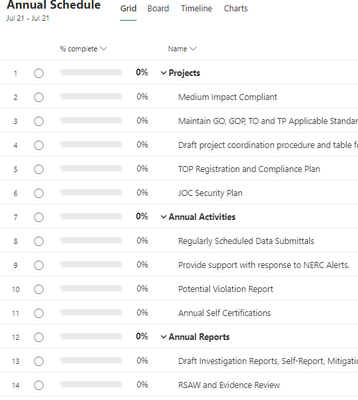
This is the project level from the project table.
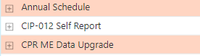
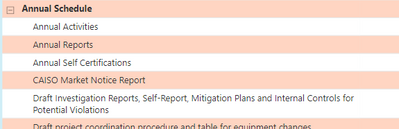
But when I expland the project, the summary tasks are at the same level of all tasks and sorted alphabetically. Annual Activities is a summary task. Yet, the listing give it me me as a task (see project image below this).
It should look like this.
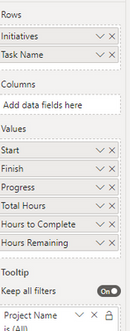
How can I get a matrix to look like the project. Here is what I have (initiative is rename from Project Name)
Solved! Go to Solution.
Hi @Anonymous,
I'd like to suggest you create a table with all value field names and an index column to setting custom sort order.
Custom Sorting in Power BI – Power BI & Excel are better together (excelnaccess.com)
After these steps, you can use the new table filed on matrix column, then you can write a measruer formula to get the current field value to lookup raw table field values.
Regards,
Xiaoxin Sheng
Hi,
Need help regarding extracting Task Summary Names too.
How did you solve this issue?
I checked the answer marked as the solution but did not quite understand it.
I am using Microsoft Project Online to extract details.
Currently, Power BI is extracting everything as a normal Task only.
Can you explain how did you highlight which Task names are Summary Tasks?
Thanks !!
Hey @Anonymous ,
you should be able to solve that with a sort by column for each column:
https://radacad.com/sort-by-column-in-power-bi
If you need any help please let me know.
If I answered your question I would be happy if you could mark my post as a solution ✔️ and give it a thumbs up 👍
Best regards
Denis
Blog: WhatTheFact.bi
Follow me: twitter.com/DenSelimovic
I can't seem to get that to work. The template I'm using is from the Microsoft project dashboard download. If you look above the project image (from the Annual Schedule projecy) has summary/subtasks. The Task Name is from the Project Task Table. What column would I use to sort.
Hi @Anonymous,
I'd like to suggest you create a table with all value field names and an index column to setting custom sort order.
Custom Sorting in Power BI – Power BI & Excel are better together (excelnaccess.com)
After these steps, you can use the new table filed on matrix column, then you can write a measruer formula to get the current field value to lookup raw table field values.
Regards,
Xiaoxin Sheng
If you have recently started exploring Fabric, we'd love to hear how it's going. Your feedback can help with product improvements.
A new Power BI DataViz World Championship is coming this June! Don't miss out on submitting your entry.
| User | Count |
|---|---|
| 44 | |
| 43 | |
| 38 | |
| 19 | |
| 15 |
| User | Count |
|---|---|
| 68 | |
| 66 | |
| 31 | |
| 28 | |
| 24 |