cancel
Showing results for 
Search instead for 
Did you mean: 

Join the FabCon + SQLCon recap series. Up next: Power BI, Real-Time Intelligence, IQ and AI, and Data Factory take center stage. All sessions are available on-demand after the live show. Register now

Reply
itsmebvk
Continued Contributor

Product Ranking in Total Group Values?


Hi Experts,


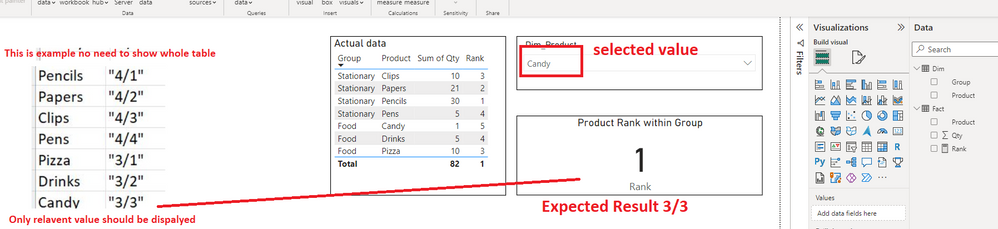
I am trying to create a report where I want to show selected product ranking based on slicer selection, along with that i also want to show total product count with in the group which the selected product belongs to.


For example : As shown below when I selected candy in slicer my card below should display as "3/3", because Food Group have 3 products out of that candy ranking is 3. (please see attached sample data and file). 


itsmebvamsi_1-1681450901020.png


Expression mentioned below not considering groups.

Rank = RANKX(ALL(Dim),CALCULATE(SUM('Fact'[Qty]),ALLEXCEPT(Dim,Dim[Product])),,DESC,Dense)


Sampel Data


Can you please suggest workaround to fix this issue?


Regards

Bvk

1 ACCEPTED SOLUTION

Hi @itsmebvk ,

Follow the steps Below:


1-Create a measure:

QuantityMeasure = SUM('Fact'[Qty])


2-The Create this one for your count:

CountofProductsMeasure =
CALCULATE (
    COUNTROWS ( VALUES ( Dim[Product] ) ),
    FILTER ( ALL ( DIM ), Dim[Group] = SELECTEDVALUE ( Dim[Group] ) )
)


3-Then this one for your Ranking:

RankMeasure =
CALCULATE (
    RANKX (
        FILTER (
            SUMMARIZE ( ALL ( Dim ), Dim[Product], Dim[Group] ),
            Dim[Group] = SELECTEDVALUE ( Dim[Group] )
        ),
        [QuantityMeasure]
    )
)


4-And the last step:

ConcatenatedMeasure = "''" &[CountofProductsMeasure] & "/" & [RankMeasure] & "''"


If this answer solves your problem, give it a thumbs up and mark it as an accepted solution so the others would find what they need easier.

Regards,
Loran


View solution in original post

5 REPLIES 5
Ahmedx
Super User
Super User

itsmebvk
Continued Contributor

@Ahmedx  This is another great solution to rank based on lowest level. Really appreciate your help on this.

itsmebvk
Continued Contributor

thanks  alot @Ahmedx  for your reply.


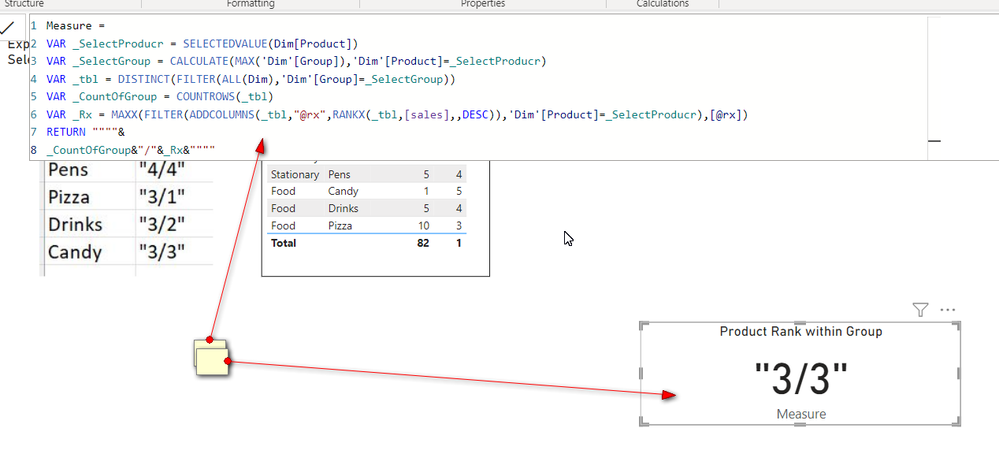
Apologies in the sample data i provided I have given only two levels dimensions, but in real data another I have another level below Product. because of that when i follow the same method you suggested its giving ranking based on the lowest level. Can you please suggest how we can alter this?  I need same output based on Product level. not subcategory level.


itsmebvamsi_0-1681474613870.png


Please find the attched updated file.

Hi @itsmebvk ,

Follow the steps Below:


1-Create a measure:

QuantityMeasure = SUM('Fact'[Qty])


2-The Create this one for your count:

CountofProductsMeasure =
CALCULATE (
    COUNTROWS ( VALUES ( Dim[Product] ) ),
    FILTER ( ALL ( DIM ), Dim[Group] = SELECTEDVALUE ( Dim[Group] ) )
)


3-Then this one for your Ranking:

RankMeasure =
CALCULATE (
    RANKX (
        FILTER (
            SUMMARIZE ( ALL ( Dim ), Dim[Product], Dim[Group] ),
            Dim[Group] = SELECTEDVALUE ( Dim[Group] )
        ),
        [QuantityMeasure]
    )
)


4-And the last step:

ConcatenatedMeasure = "''" &[CountofProductsMeasure] & "/" & [RankMeasure] & "''"


If this answer solves your problem, give it a thumbs up and mark it as an accepted solution so the others would find what they need easier.

Regards,
Loran


@MohammadLoran25  This worked like a charm. Thanks alot for quick inputs.

Helpful resources

Announcements
April Power BI Update Carousel

Power BI Monthly Update - April 2026

Check out the April 2026 Power BI update to learn about new features.

New to Fabric survey Carousel

New to Fabric Survey

If you have recently started exploring Fabric, we'd love to hear how it's going. Your feedback can help with product improvements.

Power BI DataViz World Championships carousel

Power BI DataViz World Championships - June 2026

A new Power BI DataViz World Championship is coming this June! Don't miss out on submitting your entry.

FabCon and SQLCon Highlights Carousel

FabCon &SQLCon Highlights

Experience the highlights from FabCon & SQLCon, available live and on-demand starting April 14th.