Get certified for free when you join Fabric Data Days 2026 and dive into Fabric, Power BI, SQL, AI, and other essential data skills.
Join nowTry your skills in the Power BI Dataviz World Championship! Round one ends June 26. Join now
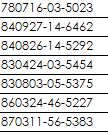
I have a text column data which is national ID. The first 2 characters are Year, following 2 characters are Month and the next 2 characters are Day.
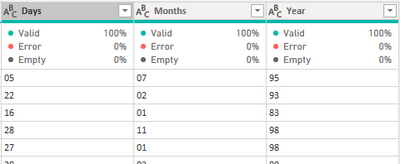
I have use Extract > Range in Add Column menu of Power Query to seperate out 3 columns for the first 6 digit. So I have Year, Month and Day column. Each of these column is having 2 characters in Text data type.
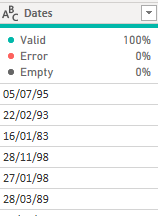
Next, I highlighted these 3 columns and right click to select Merge Columns, seperator is / . The output is like this
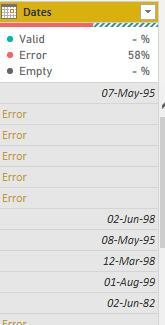
Then, I change the data type to Date data type. However, it comes out with Error.
How to solve this errror?
This works.
Hi,
I think your setting is mm/dd/yyyy, but you want dd/mm/yyyy. (Or, other way round)
Please try the below.
-Place the cursor on the column name [Dates]
-Right click
-select "Change Type" -> "Using Locale"
-select "Data Type" = "Date"
-select "Locale" = English (United Kingdom) or your setting.
| User | Count |
|---|---|
| 24 | |
| 22 | |
| 21 | |
| 20 | |
| 12 |
| User | Count |
|---|---|
| 66 | |
| 56 | |
| 45 | |
| 43 | |
| 30 |