cancel
Showing results for 
Search instead for 
Did you mean: 

Data Days is here! Join us now for 60+ days of learning, challenges, and connection. Learn more

Reply
GMichaud
Helper I
Helper I

Problem with dates

Hello community!


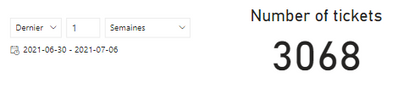
I just noticed a strange behavior in the segment vizual if I use dates with various functions of this vizual. Here are two examples :

GMichaud_0-1625672037561.pngGMichaud_1-1625672136972.png


From what I can see, the ranges of dates are the same. How come the result that is shown in the card is different? Anybody has an idea on that?


Thanks!


5 REPLIES 5
Kumail
Impactful Individual

Hello @GMichaud 


If you could send sample .pbix that demonstrate what you are looking to get. It would really help providing you a quick solution.


You can send the sample .pbix file by adding it to your drive or dropbox and add the link here.


Regards
Kumail Raza

@Kumail sadly, that won't be possible. I can tell you that the card shows the result of a calculated measure that uses the COUNTROWS function though. Does that help narrow it down?

Hi @GMichaud ,


Did you have a date table in your data model? Would you please try to create a date table and create an one to many relationship between date table and fact table and use the same date column for two slicers?


It works well based on my test, there could be some other filter on your card visual. It's better that you can share us the sample pbix with the issue.


If this post helps, then please consider Accept it as the solution to help the other members find it more quickly.


Best Regards,

Dedmon Dai


@v-deddai1-msft 

Indeed, I have a date table and it is marked as such. Would it be possible that DAX reacts as SQL does sometimes when you use something like this :
date >= '2021-07-01' AND date <= '2021-07-07' instead of date >= '2021-07-01T00:00:00.000' AND date <= '2021-07-01T23:59:59.999'

I've experienced some strange behaviors in the past with this also.

Thanks!

Hi @GMichaud ,


It depends on what's the field you used to connect to date table. Is it a datetime type or date type? 

It's better that you can share us the sample pbix with the issue.


If this post helps, then please consider Accept it as the solution to help the other members find it more quickly.


Best Regards,

Dedmon Dai

Helpful resources

Announcements
Fabric Data Days is here Carousel

Fabric Data Days 2026

Don't miss out on Data Days, June 15 through August 7. Learn Fabric, Power BI, SQL, AI and more.

May Power BI Update Carousel

Power BI Monthly Update - May 2026

Check out the May 2026 Power BI update to learn about new features.

Power BI DataViz World Championships carousel

Power BI DataViz World Championships - June 2026

A new Power BI DataViz World Championship is coming this June! Don't miss out on submitting your entry.