cancel
Showing results for 
Search instead for 
Did you mean: 

The Power BI Data Visualization World Championships is back! It's time to submit your entry. Live now!

Reply
Anonymous
Not applicable

Problem while multiplying 2 columns

Hello,


My objective is to multiply one column (column A) with an other. The second column must change (lets say with 4 different columns 1, column 2, column 3 and column 4)) when the user selects on a filter the one he wants.

To do so, I make a new table (Column Table) with the corresponding title of the 4 columns (so the Column Table has only 1 column and 4 rows with" column 1", "column 2",...).

Then with the function SWITCH, I create a new measure that is the result of the multiplication beetween column A and column 1, 2, 3 or 4 in function of the Column Table which is filtered by the user. 

It is possible to print the result of this product only on one table and every chart I want. The operation works perfectly, and select a column in the filter makes the measure result change as expected.

But I can see this measure only on one table, I can't create another table and put the measure in whereas the table has exactly the same parameters. It shows : A table of multiple values was supplied where a single value was expected.... Concerning charts, I can put the measure in most of the charts I want....


Thanks for helping me.


1 ACCEPTED SOLUTION
Anonymous
Not applicable

@Anonymous ,

Please change your measure to the following:

Result = IF(ISFILTERED(Table2[Coefficient Choice])&&HASONEVALUE(Table2[Coefficient Choice]),IF(LASTNONBLANK(Table2[Coefficient Choice],0)="Coefficient 1",MAX(Table1[Marks])*MAX(Table1[Coefficient 1]),IF(LASTNONBLANK(Table2[Coefficient Choice],0)="Coefficient 2",MAX(Table1[Marks])*MAX(Table1[Coefficient 2]),MAX(Table1[Marks])*MAX(Table1[Coefficient 3]))),BLANK())


Reference:
https://community.powerbi.com/t5/Community-Knowledge-Base/Dynamic-column-based-on-slicer-selection/ta-p/162635

Regards,
Lydia

View solution in original post

4 REPLIES 4
Anonymous
Not applicable

@Anonymous ,

Please share sample data of your tables and post expected result based on sample data here. There is a blog for your reference.

https://community.powerbi.com/t5/Community-Blog/How-to-Get-Your-Question-Answered-Quickly/ba-p/38490


Regards,
Lydia

Anonymous
Not applicable

Yes, sorry i wanted to do it too quickly.


Here are my datas,
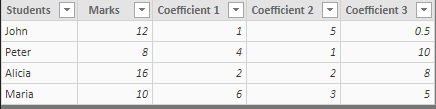
 

image.png


I want to multiply the [Marks] column with one of the 3 columns ([Coefficient 1], [Coefficient 2], [Coefficient 3]). The user can choose the column he wants to be multiplied by the column [Marks].


To do so I created the simple following table :
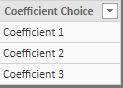
 

image.png


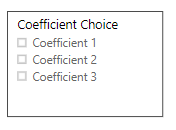
And I 'put' it in a filter : 


image.png

then, I created a measure with the following formula :

 

image.png


So when the user select one of the Coefficient, the result is the multiplication of the [Marks] column with the selected column.


Now creating a table to see the column [result] with the column students works sometimes but sometimes no. nd if I want to make charts with this datas some are working and some no. 

See the followong screenshot with a working table, a non-working one and a working chart. 

The two table have the same parameters....
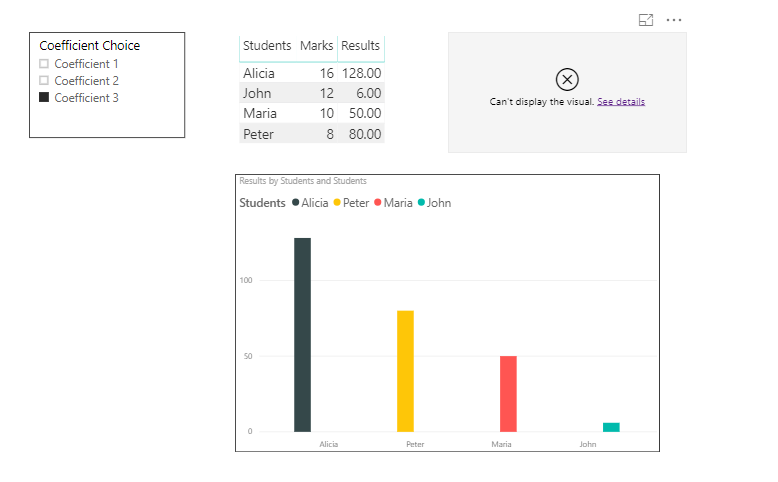
 

image.png

When I change of coefficient in the filter all datas are automaticly updated as expected.

But I do not understand why there is sometimes an error. The error message is : 
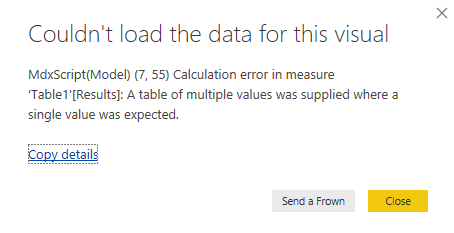
 

image.png


I hope it is clearer now,


Cyprien


Anonymous
Not applicable

@Anonymous ,

Please change your measure to the following:

Result = IF(ISFILTERED(Table2[Coefficient Choice])&&HASONEVALUE(Table2[Coefficient Choice]),IF(LASTNONBLANK(Table2[Coefficient Choice],0)="Coefficient 1",MAX(Table1[Marks])*MAX(Table1[Coefficient 1]),IF(LASTNONBLANK(Table2[Coefficient Choice],0)="Coefficient 2",MAX(Table1[Marks])*MAX(Table1[Coefficient 2]),MAX(Table1[Marks])*MAX(Table1[Coefficient 3]))),BLANK())


Reference:
https://community.powerbi.com/t5/Community-Knowledge-Base/Dynamic-column-based-on-slicer-selection/ta-p/162635

Regards,
Lydia

Anonymous
Not applicable

Hello @Anonymous 


Thanks for your answer, it works !


Actually my formula works also when I replace the VALUES() by MAX() as you use to make the column product.


Do you know why it works using MAX() instead of VALUES() ?


Thanks again,


Cyprien

Helpful resources

Announcements
FabCon Atlanta 2026 carousel

FabCon Atlanta 2026

Join us at FabCon Atlanta, March 16-20, for the ultimate Fabric, Power BI, AI and SQL community-led event. Save $200 with code FABCOMM.