cancel
Showing results for 
Search instead for 
Did you mean: 

The Power BI Data Visualization World Championships is back! Get ahead of the game and start preparing now! Learn more

Reply
Anonymous
Not applicable

Problem while multiplying 2 columns

Hello,


My objective is to multiply one column (column A) with an other. The second column must change (lets say with 4 different columns 1, column 2, column 3 and column 4)) when the user selects on a filter the one he wants.

To do so, I make a new table (Column Table) with the corresponding title of the 4 columns (so the Column Table has only 1 column and 4 rows with" column 1", "column 2",...).

Then with the function SWITCH, I create a new measure that is the result of the multiplication beetween column A and column 1, 2, 3 or 4 in function of the Column Table which is filtered by the user. 

It is possible to print the result of this product only on one table and every chart I want. The operation works perfectly, and select a column in the filter makes the measure result change as expected.

But I can see this measure only on one table, I can't create another table and put the measure in whereas the table has exactly the same parameters. It shows : A table of multiple values was supplied where a single value was expected.... Concerning charts, I can put the measure in most of the charts I want....


Thanks for helping me.


1 ACCEPTED SOLUTION
Anonymous
Not applicable

@Anonymous ,

Please change your measure to the following:

Result = IF(ISFILTERED(Table2[Coefficient Choice])&&HASONEVALUE(Table2[Coefficient Choice]),IF(LASTNONBLANK(Table2[Coefficient Choice],0)="Coefficient 1",MAX(Table1[Marks])*MAX(Table1[Coefficient 1]),IF(LASTNONBLANK(Table2[Coefficient Choice],0)="Coefficient 2",MAX(Table1[Marks])*MAX(Table1[Coefficient 2]),MAX(Table1[Marks])*MAX(Table1[Coefficient 3]))),BLANK())


Reference:
https://community.powerbi.com/t5/Community-Knowledge-Base/Dynamic-column-based-on-slicer-selection/ta-p/162635

Regards,
Lydia

View solution in original post

4 REPLIES 4
Anonymous
Not applicable

@Anonymous ,

Please share sample data of your tables and post expected result based on sample data here. There is a blog for your reference.

https://community.powerbi.com/t5/Community-Blog/How-to-Get-Your-Question-Answered-Quickly/ba-p/38490


Regards,
Lydia

Anonymous
Not applicable

Yes, sorry i wanted to do it too quickly.


Here are my datas,
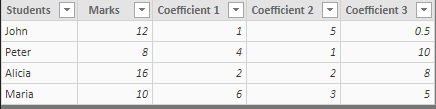
 

image.png


I want to multiply the [Marks] column with one of the 3 columns ([Coefficient 1], [Coefficient 2], [Coefficient 3]). The user can choose the column he wants to be multiplied by the column [Marks].


To do so I created the simple following table :
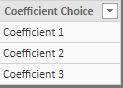
 

image.png


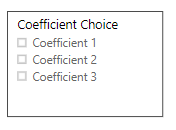
And I 'put' it in a filter : 


image.png

then, I created a measure with the following formula :

 

image.png


So when the user select one of the Coefficient, the result is the multiplication of the [Marks] column with the selected column.


Now creating a table to see the column [result] with the column students works sometimes but sometimes no. nd if I want to make charts with this datas some are working and some no. 

See the followong screenshot with a working table, a non-working one and a working chart. 

The two table have the same parameters....
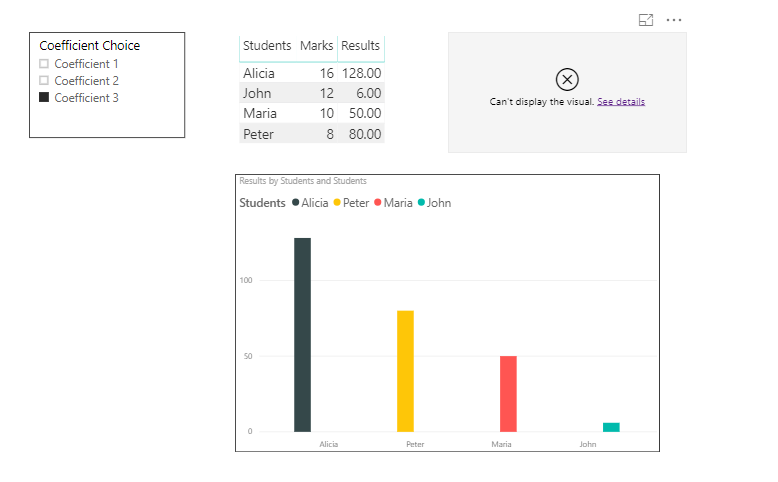
 

image.png

When I change of coefficient in the filter all datas are automaticly updated as expected.

But I do not understand why there is sometimes an error. The error message is : 
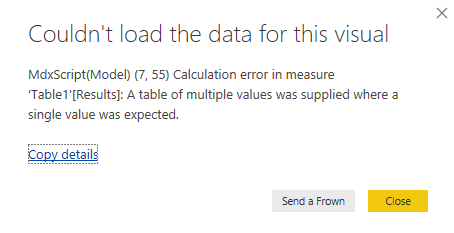
 

image.png


I hope it is clearer now,


Cyprien


Anonymous
Not applicable

@Anonymous ,

Please change your measure to the following:

Result = IF(ISFILTERED(Table2[Coefficient Choice])&&HASONEVALUE(Table2[Coefficient Choice]),IF(LASTNONBLANK(Table2[Coefficient Choice],0)="Coefficient 1",MAX(Table1[Marks])*MAX(Table1[Coefficient 1]),IF(LASTNONBLANK(Table2[Coefficient Choice],0)="Coefficient 2",MAX(Table1[Marks])*MAX(Table1[Coefficient 2]),MAX(Table1[Marks])*MAX(Table1[Coefficient 3]))),BLANK())


Reference:
https://community.powerbi.com/t5/Community-Knowledge-Base/Dynamic-column-based-on-slicer-selection/ta-p/162635

Regards,
Lydia

Anonymous
Not applicable

Hello @Anonymous 


Thanks for your answer, it works !


Actually my formula works also when I replace the VALUES() by MAX() as you use to make the column product.


Do you know why it works using MAX() instead of VALUES() ?


Thanks again,


Cyprien

Helpful resources

Announcements
Power BI DataViz World Championships

Power BI Dataviz World Championships

The Power BI Data Visualization World Championships is back! Get ahead of the game and start preparing now!

December 2025 Power BI Update Carousel

Power BI Monthly Update - December 2025

Check out the December 2025 Power BI Holiday Recap!

FabCon Atlanta 2026 carousel

FabCon Atlanta 2026

Join us at FabCon Atlanta, March 16-20, for the ultimate Fabric, Power BI, AI and SQL community-led event. Save $200 with code FABCOMM.