This time we’re going bigger than ever. Fabric, Power BI, SQL, AI and more. We're covering it all. You won't want to miss it.
Learn moreJoin the FabCon + SQLCon recap series. Up next: Power BI, Real-Time Intelligence, IQ and AI, and Data Factory take center stage. All sessions are available on-demand after the live show. Register now
Hi,
I need advice.
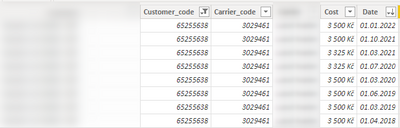
I have table with this columns
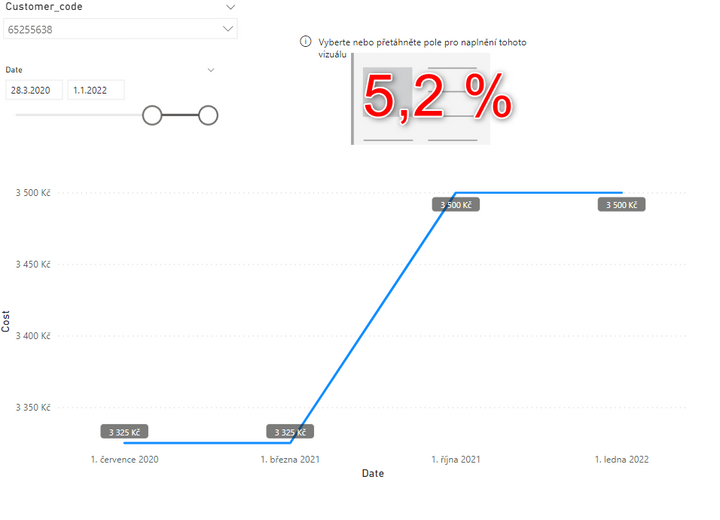
I want to create percenatge difference between the date
For example: from 3 325Kč to 3 500Kč = 5,2%
Thank you
Ondřej
Solved! Go to Solution.
@Fidzi8 , Assume you are using a date table for slicer,
Try measure like
Measure =
VAR _min = MINX(allselected(Dates) ,Dates[Date])
VAR _max = MAXX(allselected(Dates) ,Dates[Date])
return
calculate(sum(Table[cost]), filter(Dates, Dates[Date] =_max)) -calculate(sum(Table[cost]), filter(Dates, Dates[Date] =_min))
Day Intelligence - Last day, last non continous day
https://medium.com/@amitchandak.1978/power-bi-day-intelligence-questions-time-intelligence-5-5-5c324...
Hi, @Fidzi8
Try this:
Measure =
VAR _min =
MINX( ALLSELECTED( Dates ), Dates[Date] )
VAR _max =
MAXX( ALLSELECTED( Dates ), Dates[Date] )
VAR _a =
CALCULATE(
SUM( Table[cost] ),
FILTER( ALL( 'Dates' ), Dates[Date] = _min )
)
VAR _b =
CALCULATE(
SUM( Table[cost] ),
FILTER( ALL( 'Dates' ), Dates[Date] = _max )
)
RETURN
DIVIDE( b - a, b )
Or, please share your sample pbix file's link here, then I can try to look into it to come up with a more accurate measure.
Best Regards,
Community Support Team _ Zeon Zheng
If this post helps, then please consider Accept it as the solution to help the other members find it more quickly.
Hi, @Fidzi8
Try this:
Measure =
VAR _min =
MINX( ALLSELECTED( Dates ), Dates[Date] )
VAR _max =
MAXX( ALLSELECTED( Dates ), Dates[Date] )
VAR _a =
CALCULATE(
SUM( Table[cost] ),
FILTER( ALL( 'Dates' ), Dates[Date] = _min )
)
VAR _b =
CALCULATE(
SUM( Table[cost] ),
FILTER( ALL( 'Dates' ), Dates[Date] = _max )
)
RETURN
DIVIDE( b - a, b )
Or, please share your sample pbix file's link here, then I can try to look into it to come up with a more accurate measure.
Best Regards,
Community Support Team _ Zeon Zheng
If this post helps, then please consider Accept it as the solution to help the other members find it more quickly.
@Fidzi8 , Assume you are using a date table for slicer,
Try measure like
Measure =
VAR _min = MINX(allselected(Dates) ,Dates[Date])
VAR _max = MAXX(allselected(Dates) ,Dates[Date])
return
calculate(sum(Table[cost]), filter(Dates, Dates[Date] =_max)) -calculate(sum(Table[cost]), filter(Dates, Dates[Date] =_min))
Day Intelligence - Last day, last non continous day
https://medium.com/@amitchandak.1978/power-bi-day-intelligence-questions-time-intelligence-5-5-5c324...
Hi @amitchandak,
thank you for your help.
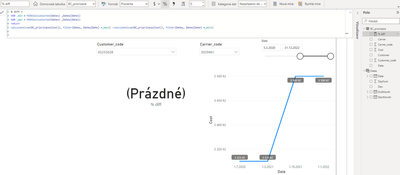
The formula doesn´t work properly and I don´t know where the error might be.
Thank you
Ondřej
Check out the April 2026 Power BI update to learn about new features.
If you have recently started exploring Fabric, we'd love to hear how it's going. Your feedback can help with product improvements.
A new Power BI DataViz World Championship is coming this June! Don't miss out on submitting your entry.
| User | Count |
|---|---|
| 38 | |
| 38 | |
| 31 | |
| 22 | |
| 15 |
| User | Count |
|---|---|
| 74 | |
| 61 | |
| 31 | |
| 31 | |
| 23 |