Get certified for free when you join Fabric Data Days 2026 and dive into Fabric, Power BI, SQL, AI, and other essential data skills.
Join nowJuly 7 - July 17 | Round 2 of the Power BI Dataviz World Championships. Don't miss your chance! Learn more
Hi,
I need advice.
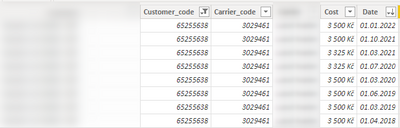
I have table with this columns
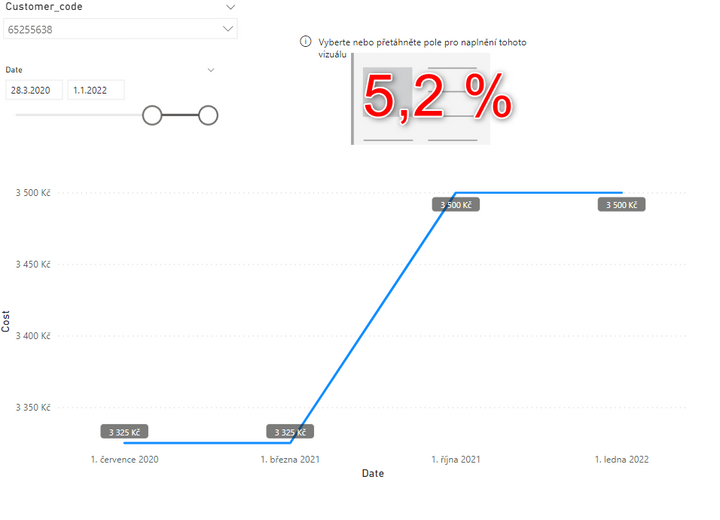
I want to create percenatge difference between the date
For example: from 3 325Kč to 3 500Kč = 5,2%
Thank you
Ondřej
Solved! Go to Solution.
@Fidzi8 , Assume you are using a date table for slicer,
Try measure like
Measure =
VAR _min = MINX(allselected(Dates) ,Dates[Date])
VAR _max = MAXX(allselected(Dates) ,Dates[Date])
return
calculate(sum(Table[cost]), filter(Dates, Dates[Date] =_max)) -calculate(sum(Table[cost]), filter(Dates, Dates[Date] =_min))
Day Intelligence - Last day, last non continous day
https://medium.com/@amitchandak.1978/power-bi-day-intelligence-questions-time-intelligence-5-5-5c324...
Hi, @Fidzi8
Try this:
Measure =
VAR _min =
MINX( ALLSELECTED( Dates ), Dates[Date] )
VAR _max =
MAXX( ALLSELECTED( Dates ), Dates[Date] )
VAR _a =
CALCULATE(
SUM( Table[cost] ),
FILTER( ALL( 'Dates' ), Dates[Date] = _min )
)
VAR _b =
CALCULATE(
SUM( Table[cost] ),
FILTER( ALL( 'Dates' ), Dates[Date] = _max )
)
RETURN
DIVIDE( b - a, b )
Or, please share your sample pbix file's link here, then I can try to look into it to come up with a more accurate measure.
Best Regards,
Community Support Team _ Zeon Zheng
If this post helps, then please consider Accept it as the solution to help the other members find it more quickly.
Hi, @Fidzi8
Try this:
Measure =
VAR _min =
MINX( ALLSELECTED( Dates ), Dates[Date] )
VAR _max =
MAXX( ALLSELECTED( Dates ), Dates[Date] )
VAR _a =
CALCULATE(
SUM( Table[cost] ),
FILTER( ALL( 'Dates' ), Dates[Date] = _min )
)
VAR _b =
CALCULATE(
SUM( Table[cost] ),
FILTER( ALL( 'Dates' ), Dates[Date] = _max )
)
RETURN
DIVIDE( b - a, b )
Or, please share your sample pbix file's link here, then I can try to look into it to come up with a more accurate measure.
Best Regards,
Community Support Team _ Zeon Zheng
If this post helps, then please consider Accept it as the solution to help the other members find it more quickly.
@Fidzi8 , Assume you are using a date table for slicer,
Try measure like
Measure =
VAR _min = MINX(allselected(Dates) ,Dates[Date])
VAR _max = MAXX(allselected(Dates) ,Dates[Date])
return
calculate(sum(Table[cost]), filter(Dates, Dates[Date] =_max)) -calculate(sum(Table[cost]), filter(Dates, Dates[Date] =_min))
Day Intelligence - Last day, last non continous day
https://medium.com/@amitchandak.1978/power-bi-day-intelligence-questions-time-intelligence-5-5-5c324...
Hi @amitchandak,
thank you for your help.
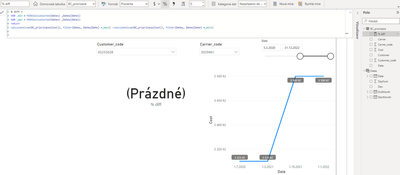
The formula doesn´t work properly and I don´t know where the error might be.
Thank you
Ondřej
Join us in Barcelona for FabCon and SQLCon, the Fabric, Power BI, SQL, and AI community event. Save €200 with code FABCMTY200.
If you love stickers, then you will definitely want to check out our community sticker challenge, Barcelona edition!
Check out the July 2026 Power BI update to learn about new features.
| User | Count |
|---|---|
| 30 | |
| 26 | |
| 23 | |
| 23 | |
| 14 |
| User | Count |
|---|---|
| 47 | |
| 33 | |
| 20 | |
| 18 | |
| 16 |