Learn from the best! Meet the four finalists headed to the FINALS of the Power BI Dataviz World Championships! Register now
Talking about M (Power Query) language here. How can I parameterize or otherwise make dynamic the 3 arguments in the #date function?
#date(2017, 6, 16)
I have a 1 row, 1 column table with a single date value (which will change dynamically upon refresh) and I want to add rows (future dates) to that table. The #date function seems to want to accept only hard-coded numbers. I've gotta believe that either isn't true or there is another way.
Thanks!!
Solved! Go to Solution.
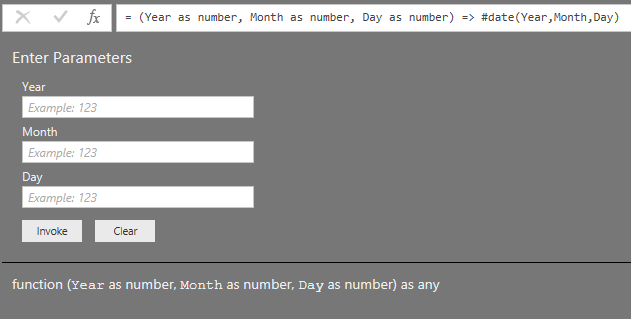
You don't need hard coded values: this function works perfectly fine;
Edit: If you are looking for alternatives then please specify exactly what should happen.
E.g. you can create a series of numbers and then change the type to date.
Or you can use List.Dates.
E,g, this fuction creates a table with1 column with 10 dates:
(Year as number, Month as number, Day as number) => Table.FromColumns({List.Dates(#date(Year,Month,Day),10,#duration(1,0,0,0))}, type table[Date as date])
You don't need #date if you have a date in a single row, single column table. Just load it up and change to format to type date if needed
You don't need hard coded values: this function works perfectly fine;
Edit: If you are looking for alternatives then please specify exactly what should happen.
E.g. you can create a series of numbers and then change the type to date.
Or you can use List.Dates.
E,g, this fuction creates a table with1 column with 10 dates:
(Year as number, Month as number, Day as number) => Table.FromColumns({List.Dates(#date(Year,Month,Day),10,#duration(1,0,0,0))}, type table[Date as date])
Thanks @MarcelBeug. I was able to adopt a concept from your reply to make my effort work. I replicated my single cell query 3 times so that I could convert each component (year, month, and day) into lists. So I ended up with 3 list queries. I was then able to create parameters (query option) on each of those. I was then able to create a new query that used those parameters to generate a list of dates. Not sure if my solution is the best way to go about this but at least its dynamic and automated and gets me what I want.
If you have recently started exploring Fabric, we'd love to hear how it's going. Your feedback can help with product improvements.
A new Power BI DataViz World Championship is coming this June! Don't miss out on submitting your entry.
Share feedback directly with Fabric product managers, participate in targeted research studies and influence the Fabric roadmap.
| User | Count |
|---|---|
| 57 | |
| 33 | |
| 33 | |
| 19 | |
| 18 |
| User | Count |
|---|---|
| 67 | |
| 67 | |
| 45 | |
| 30 | |
| 26 |