This time we’re going bigger than ever. Fabric, Power BI, SQL, AI and more. We're covering it all. You won't want to miss it.
Learn moreGet Fabric Certified for FREE during AI Skills Fest. This week only. Secure your voucher now.
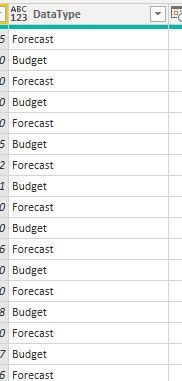
I need to write a custom column in powerquery that returns a value of "1" for "Budget" in the column DataType and a value of "2" for "Forecast"
Solved! Go to Solution.
Hi @Anonymous ,
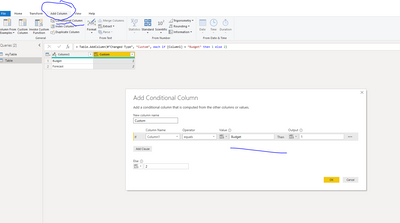
Go to add column tab, Conditional Column, and fill in the boxes as below.
Let me know if you have any questions.
If this solves your issues, please mark it as the solution, so that others can find it easily. Kudos 👍are nice too.
Nathaniel
Proud to be a Super User!
Hi @Anonymous ,
Go to add column tab, Conditional Column, and fill in the boxes as below.
Let me know if you have any questions.
If this solves your issues, please mark it as the solution, so that others can find it easily. Kudos 👍are nice too.
Nathaniel
Proud to be a Super User!
I also determined that if you complete the custom column in m language it automatically converts it into a conditional column.
Thank You very much!
Hi @Anonymous ,
Yes, that is true. Once you work more with Power Query, you will be able to write all your columns as custom columns. The trick is study how the Advanced Editor changes the syntax. @KenPuls has written a great book M is for (Data) Monkey, gives you lots of tips, tricks and patterns.
You are very welcome!
Nathaniel
Proud to be a Super User!
Check out the May 2026 Power BI update to learn about new features.
Sign up to receive a private message when registration opens and key events begin.
If you have recently started exploring Fabric, we'd love to hear how it's going. Your feedback can help with product improvements.
| User | Count |
|---|---|
| 25 | |
| 24 | |
| 22 | |
| 19 | |
| 18 |
| User | Count |
|---|---|
| 44 | |
| 43 | |
| 42 | |
| 21 | |
| 21 |