cancel
Showing results for 
Search instead for 
Did you mean: 

Learn from the best! Meet the four finalists headed to the FINALS of the Power BI Dataviz World Championships! Register now

Reply
Anonymous
Not applicable

Powerquery IF Statement

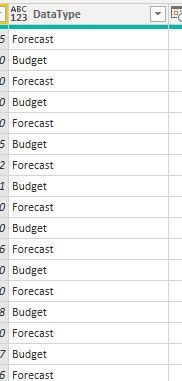
I need to write a custom column in powerquery that returns a value of "1" for "Budget" in the column DataType and a value of "2" for "Forecast"

a1.jpg

1 ACCEPTED SOLUTION
Nathaniel_C
Community Champion
Community Champion

Hi @Anonymous ,

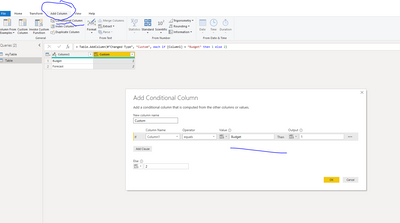
Go to add column tab, Conditional Column, and fill in the boxes as below.
Let me know if you have any questions.

If this solves your issues, please mark it as the solution, so that others can find it easily. Kudos 👍are nice too.
Nathaniel
IF budget.PNG


Did I answer your question? Mark my post as a solution!

Proud to be a Super User!


View solution in original post

3 REPLIES 3
Nathaniel_C
Community Champion
Community Champion

Hi @Anonymous ,

Go to add column tab, Conditional Column, and fill in the boxes as below.
Let me know if you have any questions.

If this solves your issues, please mark it as the solution, so that others can find it easily. Kudos 👍are nice too.
Nathaniel
IF budget.PNG


Did I answer your question? Mark my post as a solution!

Proud to be a Super User!


Anonymous
Not applicable

I also determined that if you complete the custom column in m language it automatically converts it into a conditional column.
Thank You very much!

Hi @Anonymous ,
Yes, that is true. Once you work more with Power Query, you will be able to write all your columns as custom columns. The trick is study how the Advanced Editor changes the syntax. @KenPuls has written a great book M is for (Data) Monkey, gives you lots of tips, tricks and patterns.
You are very welcome!
Nathaniel


Did I answer your question? Mark my post as a solution!

Proud to be a Super User!


Helpful resources

Announcements
Join our Fabric User Panel

Join our Fabric User Panel

Share feedback directly with Fabric product managers, participate in targeted research studies and influence the Fabric roadmap.

February Power BI Update Carousel

Power BI Monthly Update - February 2026

Check out the February 2026 Power BI update to learn about new features.

FabCon Atlanta 2026 carousel

FabCon Atlanta 2026

Join us at FabCon Atlanta, March 16-20, for the ultimate Fabric, Power BI, AI and SQL community-led event. Save $200 with code FABCOMM.