This time we’re going bigger than ever. Fabric, Power BI, SQL, AI and more. We're covering it all. You won't want to miss it.
Learn moreLevel up your Power BI skills this month - build one visual each week and tell better stories with data! Get started
Hello, I have columns with lists.
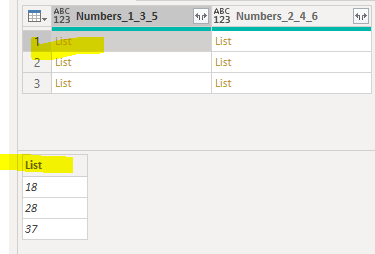
Column [Numbers_1_3_5] has this.
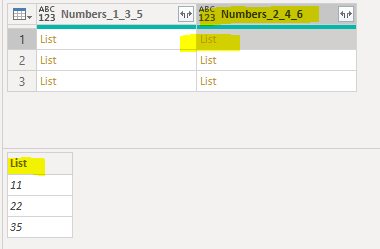
Column [Numbers_2_4_6] has this
I want to just make a new column that finds the difference between the two lists.
I tried Value.Subtract([Numbers_1_2_5],[Numbers_2_4_6]) but this doesn't work because they are in list format.
I'm used to R being able to do this but how do I do this in Power BI?
The first one should be - 11 minus 18, 22 minus 28, 35 minus 37 = -7,-6,-2
Thanks
Solved! Go to Solution.
Hi @peterhui50
It's not quite as simple as in R I'm afraid, but you can use List.Zip to combine corresponding elements from a list of lists, then perform operations on the resulting list.
For your example, the code to enter in the calculated column dialog box would be something like this:
List.Transform( List.Zip( {[Numbers_1_3_5], [Numbers_2_4_6]} ), each _{1}-_{0})
Regards,
Owen
Thanks that's amazing. I was trying to create functions and such and this solves it.
Hi @peterhui50
It's not quite as simple as in R I'm afraid, but you can use List.Zip to combine corresponding elements from a list of lists, then perform operations on the resulting list.
For your example, the code to enter in the calculated column dialog box would be something like this:
List.Transform( List.Zip( {[Numbers_1_3_5], [Numbers_2_4_6]} ), each _{1}-_{0})
Regards,
Owen
You could also create a virtual table and add a custom column:
Table.AddColumn(
Table.FromColumns({[Numbers_1_3_5], [Numbers_2_4_6]}, {"135", "246"}),
"Diff", each [246] - [135]
)[Diff]
This returns the custom column from the virtual table.
Check out the April 2026 Power BI update to learn about new features.
Sign up to receive a private message when registration opens and key events begin.
If you have recently started exploring Fabric, we'd love to hear how it's going. Your feedback can help with product improvements.
| User | Count |
|---|---|
| 35 | |
| 32 | |
| 26 | |
| 21 | |
| 18 |
| User | Count |
|---|---|
| 68 | |
| 36 | |
| 32 | |
| 25 | |
| 23 |