Join us at FabCon Atlanta from March 16 - 20, 2026, for the ultimate Fabric, Power BI, AI and SQL community-led event. Save $200 with code FABCOMM.
Register now!The Power BI Data Visualization World Championships is back! It's time to submit your entry. Live now!
Hello, I have columns with lists.
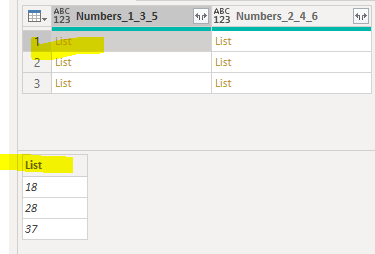
Column [Numbers_1_3_5] has this.
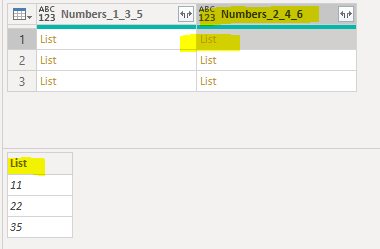
Column [Numbers_2_4_6] has this
I want to just make a new column that finds the difference between the two lists.
I tried Value.Subtract([Numbers_1_2_5],[Numbers_2_4_6]) but this doesn't work because they are in list format.
I'm used to R being able to do this but how do I do this in Power BI?
The first one should be - 11 minus 18, 22 minus 28, 35 minus 37 = -7,-6,-2
Thanks
Solved! Go to Solution.
Hi @peterhui50
It's not quite as simple as in R I'm afraid, but you can use List.Zip to combine corresponding elements from a list of lists, then perform operations on the resulting list.
For your example, the code to enter in the calculated column dialog box would be something like this:
List.Transform( List.Zip( {[Numbers_1_3_5], [Numbers_2_4_6]} ), each _{1}-_{0})
Regards,
Owen
Thanks that's amazing. I was trying to create functions and such and this solves it.
Hi @peterhui50
It's not quite as simple as in R I'm afraid, but you can use List.Zip to combine corresponding elements from a list of lists, then perform operations on the resulting list.
For your example, the code to enter in the calculated column dialog box would be something like this:
List.Transform( List.Zip( {[Numbers_1_3_5], [Numbers_2_4_6]} ), each _{1}-_{0})
Regards,
Owen
You could also create a virtual table and add a custom column:
Table.AddColumn(
Table.FromColumns({[Numbers_1_3_5], [Numbers_2_4_6]}, {"135", "246"}),
"Diff", each [246] - [135]
)[Diff]
This returns the custom column from the virtual table.
The Power BI Data Visualization World Championships is back! It's time to submit your entry.
Check out the January 2026 Power BI update to learn about new features.
| User | Count |
|---|---|
| 56 | |
| 42 | |
| 39 | |
| 23 | |
| 21 |
| User | Count |
|---|---|
| 144 | |
| 106 | |
| 63 | |
| 38 | |
| 31 |