cancel
Showing results for 
Search instead for 
Did you mean: 

July 7 - July 17 | Round 2 of the Power BI Dataviz World Championships. Don't miss your chance! Learn more

Reply
peterhui50
Helper III
Helper III

Power Query, subtraction between two lists

Hello, I have columns with lists.


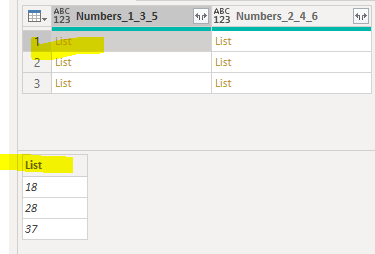
Column [Numbers_1_3_5] has this.

peterhui50_0-1642825316065.png


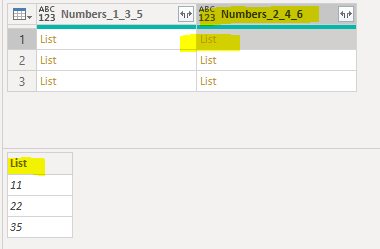
Column [Numbers_2_4_6] has this 


peterhui50_1-1642825367236.png


I want to just make a new column that finds the difference between the two lists. 

I tried Value.Subtract([Numbers_1_2_5],[Numbers_2_4_6]) but this doesn't work because they are in list format.

I'm used to R being able to do this but how do I do this in Power BI?


The first one should be - 11 minus 18, 22 minus 28, 35 minus 37 = -7,-6,-2


Thanks


1 ACCEPTED SOLUTION
OwenAuger
Super User
Super User

Hi @peterhui50 

It's not quite as simple as in R I'm afraid, but you can use List.Zip to combine corresponding elements from a list of lists, then perform operations on the resulting list.


For your example, the code to enter in the calculated column dialog box would be something like this:

List.Transform( List.Zip( {[Numbers_1_3_5], [Numbers_2_4_6]} ), each _{1}-_{0})

 Regards,

Owen


Owen Auger
Did I answer your question? Mark my post as a solution!
Blog
LinkedIn

View solution in original post

3 REPLIES 3
peterhui50
Helper III
Helper III

Thanks that's amazing. I was trying to create functions and such and this solves it.

OwenAuger
Super User
Super User

Hi @peterhui50 

It's not quite as simple as in R I'm afraid, but you can use List.Zip to combine corresponding elements from a list of lists, then perform operations on the resulting list.


For your example, the code to enter in the calculated column dialog box would be something like this:

List.Transform( List.Zip( {[Numbers_1_3_5], [Numbers_2_4_6]} ), each _{1}-_{0})

 Regards,

Owen


Owen Auger
Did I answer your question? Mark my post as a solution!
Blog
LinkedIn

You could also create a virtual table and add a custom column:

Table.AddColumn(
    Table.FromColumns({[Numbers_1_3_5], [Numbers_2_4_6]}, {"135", "246"}),
    "Diff", each [246] - [135]
)[Diff]

This returns the custom column from the virtual table. 

Helpful resources

Announcements
FabCon and SQLCon Barcelona 2026

FabCon & SQLCon – Barcelona 2026

Join us in Barcelona for FabCon and SQLCon, the Fabric, Power BI, SQL, and AI community event. Save €200 with code FABCMTY200.

60 days of Data Days Carousel

Data Days 2026

Join Fabric Data Days 2026: 60 days of free live/on-demand sessions, challenges, study groups, and certification opportunities.

Power BI DataViz World Championships carousel

Power BI DataViz World Championships - June 2026

A new Power BI DataViz World Championship is coming this June! Don't miss out on submitting your entry.