Get certified for free when you join Fabric Data Days 2026 and dive into Fabric, Power BI, SQL, AI, and other essential data skills.
Join nowJuly 28 - August 9 | Final Round of the Power BI Dataviz World Championships. This is your chance. Learn more
Hi
I have a query that readily pulls data from Salesforce Task object directly into Excel 2010 via Power Query.
I need to schedule this to run after midnight and retrieve a previous day's data, which I have attempted in Excel, Data, Connections, Properties, Refresh every x minutes.
This runs perfectly if I refresh every 10 minutes (overkill for a file that only needs to refresh daily!), but anything over 15 minute interval fails, returning a 'User not authorised' error, which I presume is a result of Saleforce disconnecting me due to inactivity. I have selected 'Remember me' in my PQ login.
Any suggestions?
The thread does not establish why Excel lost authorization after a longer interval. The suggested Timeout option did not apply to Salesforce Objects, and the data request itself was completing quickly.
For unattended Power BI refresh, the workflow can instead be published to Power BI Service. Power BI Connector for Salesforce provides an app-specific token and OData source for the Salesforce extraction.
AppExchange and 30-day trial:
https://appexchange.salesforce.com/appxListingDetail?listingId=31526f0e-abd8-4cb5-bd1a-3bd56b5c0577
Docs and support:
https://metricasoftware.com/docs/salesforce/
https://metricasoftware.com/docs/salesforce/contact-support/
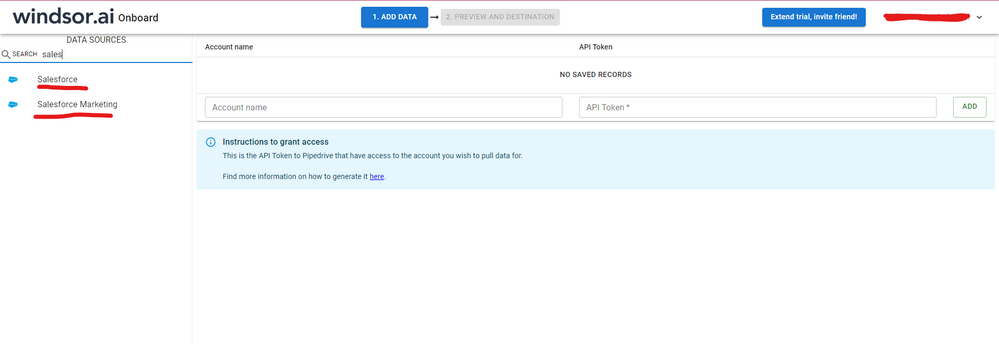
Hi @AnthonyEdmed were you able to find a solution? As a workaround, maybe you can try pulling your data directly from SF objects API through an external connector instead of using excel in the middle. I've tried windsor.ai, supermetrics and funnel.io. I stayed with windsor because it is much cheaper so just to let you know other options. In case you wonder, to make the connection first search for the Salesforce connector in the data sources list:
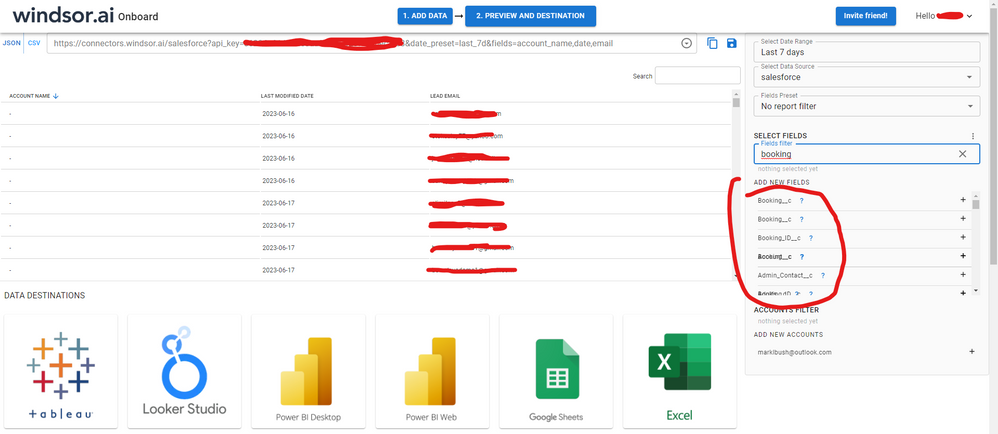
After that, just grant access to your Salesforce account using your credentials, then on preview and destination page you will see a preview of your Salesforce fields:
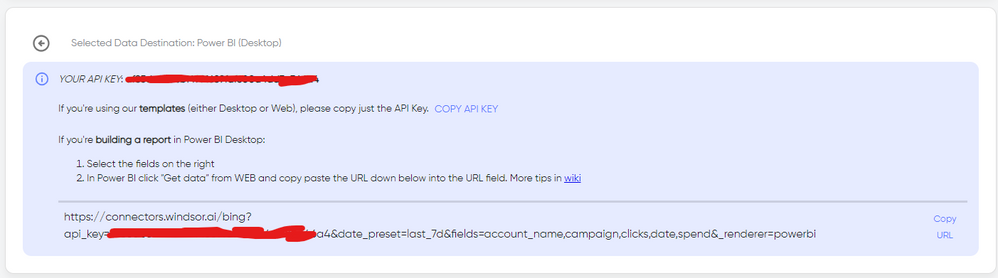
There just select the fields you need. It is also compatible with custom fields and custom objects, so you'll be able to export them through windsor. Finally, just select PBI as your data destination and finally just copy and paste the url on PBI --> Get Data --> Web --> Paste the url.
I suggest you add timeout in your underlying M query. Go to Advanced Editor, and "[Timeout=#duration(0, 0, 30, 0)]" in your query string. Please refer to links below:
https://community.powerbi.com/t5/Desktop/Query-Timeout-on-update/td-p/53459
Regards,
Thanks for the suggestion, unfortunately this doesn't appear to work with Salesforce objects:
Just for clarity, my query isn't timing out due to the time taken to pull back data from Salesforce (that works quickly) - it's the refresh that causes the issue. Not sure whether this timeout statement would resolve that?
Did you resolve this - I have exactly the same issue
Join us in Barcelona for FabCon and SQLCon, the Fabric, Power BI, SQL, and AI community event. Save €200 with code FABCMTY200.
If you love stickers, then you will definitely want to check out our community sticker challenge, Barcelona edition!
Check out the July 2026 Power BI update to learn about new features.
| User | Count |
|---|---|
| 25 | |
| 23 | |
| 23 | |
| 17 | |
| 14 |
| User | Count |
|---|---|
| 25 | |
| 24 | |
| 20 | |
| 20 | |
| 19 |