Don't miss your chance to take the Fabric Data Engineer (DP-600) exam for FREE! Find out how by attending the DP-600 session on April 23rd (pacific time), live or on-demand.
Learn moreJoin the FabCon + SQLCon recap series. Up next: Power BI, Real-Time Intelligence, IQ and AI, and Data Factory take center stage. All sessions are available on-demand after the live show. Register now
Hello
So, I need your help.
I have a problem with refreshing tables.
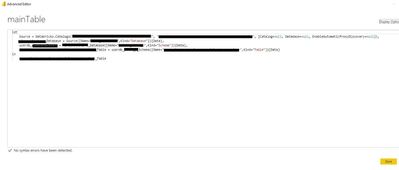
I have a table - call "mainTable", datasource is azure/databricks, have ca. 0,5mln rows.
(Steps : Source, Navigation)
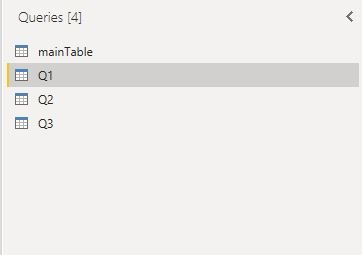
I create by right click -> Reference, three reference tables Q1,Q2,Q3.
My goal is: during refresh my project only mainTable should downloaded datasource and the other 3 reference tables should be based on this mainTable.
Unfortunately when I refresh my project all 3 reference tables downloading the same datasource (3x 0,5mln)
I checked/uncheked this but still without good result.
I read that it is possible that after downloading the first table, the other caching and based on this first downloaded table. But i dont know how can I do it 😞
HI @Anonymous,
I suppose you can try to reference from the source query table and cancel the 'include in refresh' option of the reference tables or create these in dataflow side.
Referencing Power Query queries - Power BI | Microsoft Learn
Regards,
Xiaoxin Sheng
"I suppose you can try to reference from the source query table and cancel the 'include in refresh' option of the reference tables"
its doesnt work.
Check out the April 2026 Power BI update to learn about new features.
If you have recently started exploring Fabric, we'd love to hear how it's going. Your feedback can help with product improvements.
A new Power BI DataViz World Championship is coming this June! Don't miss out on submitting your entry.
| User | Count |
|---|---|
| 48 | |
| 46 | |
| 41 | |
| 20 | |
| 17 |
| User | Count |
|---|---|
| 70 | |
| 69 | |
| 32 | |
| 27 | |
| 26 |