Hi,
I am building a staff utilisation dashboard.
I have a dataset with projects estimated start and end date. Each project is allocated to a project manager. An assumption is that a project manager should dedicate an even number of hours to a project per day (4.2)
| Project No | Start | End | Owner | available hours to work on project per day |
| 1 | 1/04/2020 | 30/07/2020 | Eunice | 4.2 |
| 2 | 1/04/2020 | 30/07/2020 | Ayla | 4.2 |
| 3 | 28/02/2020 | 30/05/2020 | Martin | 4.2 |
| 4 | 1/04/2020 | 30/10/2020 | Eunice | 4.2 |
| 5 | 1/05/2020 | 30/06/2020 | Ayla | 4.2 |
| 6 | 1/03/2020 | 30/06/2020 | Martin | 4.2 |
| 7 | 1/04/2020 | 30/06/2020 | Eunice | 4.2 |
| 8 | 1/04/2020 | 30/07/2020 | Ayla | 4.2 |
| 9 | 28/02/2020 | 30/05/2020 | Martin | 4.2 |
| 10 | 1/05/2020 | 30/06/2020 | Eunice | 4.2 |
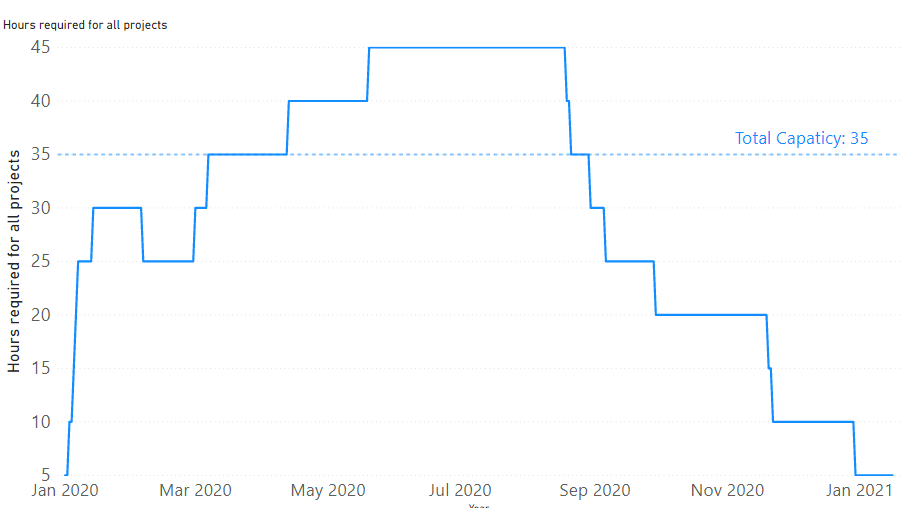
I need to be able to show how much capacity and workload we have got at any given point of time at aggragate level
The visual that I am after is something like that:
To build such visual the data should be in this layout:
| Date | Project | Name | Hours per day |
| 1/04/2020 | 1 | Eunice | 4.2 |
| 2/04/2020 | 1 | Eunice | 4.2 |
| 3/04/2020 | 1 | Eunice | 4.2 |
| … | | | |
| 30/07/2020 | 1 | Eunice | 4.2 |
| 1/04/2020 | 2 | Ayla | 4.2 |
| 2/04/2020 | 2 | Ayla | 4.2 |
| 3/04/2020 | 2 | Ayla | 4.2 |
| 4/04/2020 | 2 | Ayla | 4.2 |
| … | | | |
| 29/07/2020 | 2 | Ayla | 4.2 |
| 30/07/2020 | 2 | Ayla | 4.2 |
| …. | | | |
Is there way to convert the original dataset into the final one that using PowerQuery? Or is there way to do that without creating missing rows with dates inbetween Start and End date of a project?


