We've captured the moments from FabCon & SQLCon that everyone is talking about, and we are bringing them to the community, live and on-demand. Starts on April 14th. Register now
Hello,
I am trying to merge two queries in Power Query. For some reason, when I click from query to query I see a yellow triangle with an exclamation in the majority of my queries. When I click any of the queries with the error, the results load and error disappears. But when I click to the next query, the error occurs again in that prior query preventing me from doing anything with those queries. I have no idea where to even check to see what the error message is. Any help?
I am having an identical issue. Did you find a solution?
Hi @rawiswarden,
Could you please provide the screenshot of queries with exclamation? Is there any error message or information? In addition, can you please explain all the operations what you have done in Power BI desktop ? It should include how you connect to the data source (data source type? single or multiple data sources ? connection mode?), and the operations performed in the Power Query Editor etc.
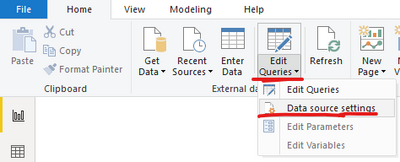
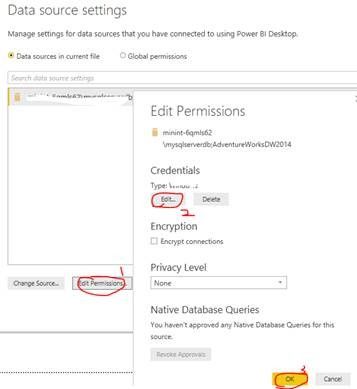
Before providing the above information, please try to complete the following operations to see if it can solve your problem...
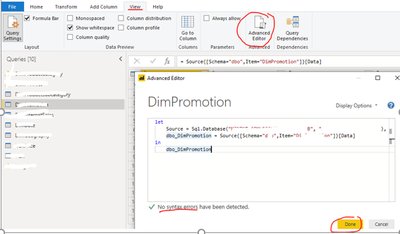
2. Check if there is any syntax error for the queries with exclamation(View --> Advanced Editor in Power Query Editor)
Best Regards
Rena
Hello, I believe the issue was I was attempting to edit a query that was merged into other queries. Where could I confirm this is the case? Surely there must be some error that goes with the visual indication somewhere
@rawiswarden wrote:Hello, I believe the issue was I was attempting to edit a query that was merged into other queries. Where could I confirm this is the case? Surely there must be some error that goes with the visual indication somewhere
I think this was the issue. I don't recall how I solved it - I probably removed the merge in the data flow and just merged the data in Power BI data model instead.
Hi @rawiswarden ,
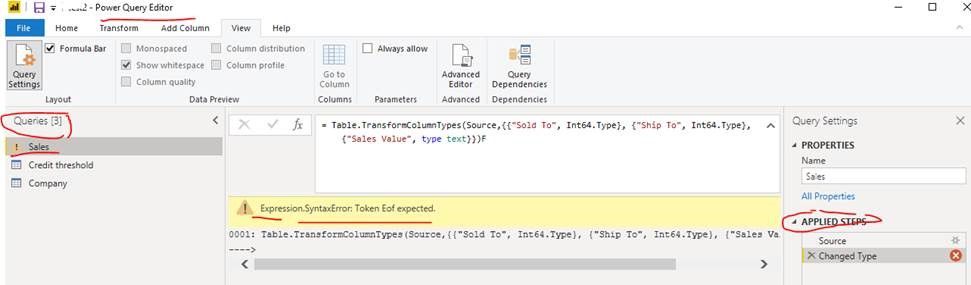
Because it is not clear what data source information you used in the report and what operations you have done , I was not able to locate the problem well. Anyway, please try to check if the steps applied for each query are correct or not? Is there any error similar to the below screenshot ? You can refer to the contents of below two links to make troubleshooting and try to find solution.
https://exceloffthegrid.com/power-query-common-errors/
In additional, you can enable Power BI desktop trace log(File –> Options –> Diagnostics –> Enable Tracing), repeat merge queries step to reproduce the issue and check if there is any detail error information in the trace log file. You can refer to this blog.
Best Regards
Rena
If you have recently started exploring Fabric, we'd love to hear how it's going. Your feedback can help with product improvements.
A new Power BI DataViz World Championship is coming this June! Don't miss out on submitting your entry.
Share feedback directly with Fabric product managers, participate in targeted research studies and influence the Fabric roadmap.
| User | Count |
|---|---|
| 57 | |
| 38 | |
| 33 | |
| 19 | |
| 16 |
| User | Count |
|---|---|
| 67 | |
| 66 | |
| 40 | |
| 34 | |
| 25 |