Don't miss your chance to take the Fabric Data Engineer (DP-600) exam for FREE! Find out how by attending the DP-600 session on April 23rd (pacific time), live or on-demand.
Learn moreNext up in the FabCon + SQLCon recap series: The roadmap for Microsoft SQL and Maximizing Developer experiences in Fabric. All sessions are available on-demand after the live show. Register now
Hi,
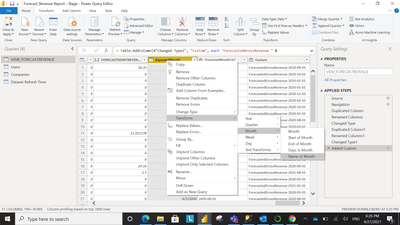
I have a column in my report which has date in it. I can extract Month Name from the column.
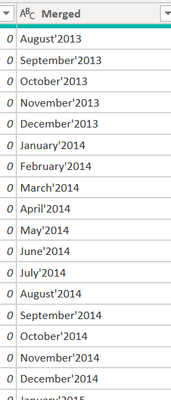
Is there any option where I can get the month and year together from this column? Like suppose I need a new column like Month'Year showing values like April'2021, May'2021 and so on in the column?
Or do I have to extract month name and year seperately and then combine them?
Regards,
Himanshu
Solved! Go to Solution.
Hi @Anonymous ,
You could use Date.ToText function to create a custom column.
https://docs.microsoft.com/en-us/powerquery-m/date-totext
Best Regards,
Jay
Hi @Anonymous ,
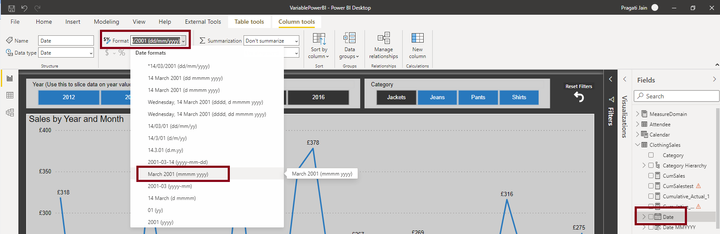
You can achieve this as below:
Click on your DATE column under FIELDS pane.
Under top ribbon, you will get the option to select required date format.
Thanks,
Pragati
@Pragati11 I actually want it in the power query only as I ned to create a custom column using that Month'Year Column.
What you've mentioned is completely right and I know it but i want it in the power query mode itself.
Hi @Anonymous ,
Add a custom column as follows in Power Query:
Date.ToText([YourDateColumn], "MMM-yyyy")
Thanks,
Pragati
I extracted individually and then merged. It solved my issue.
If you have recently started exploring Fabric, we'd love to hear how it's going. Your feedback can help with product improvements.
A new Power BI DataViz World Championship is coming this June! Don't miss out on submitting your entry.
| User | Count |
|---|---|
| 47 | |
| 44 | |
| 39 | |
| 20 | |
| 15 |
| User | Count |
|---|---|
| 70 | |
| 68 | |
| 32 | |
| 27 | |
| 25 |