Don't miss your chance to take the Fabric Data Engineer (DP-600) exam for FREE! Find out how by attending the DP-600 session on April 23rd (pacific time), live or on-demand.
Learn moreNext up in the FabCon + SQLCon recap series: The roadmap for Microsoft SQL and Maximizing Developer experiences in Fabric. All sessions are available on-demand after the live show. Register now
Hi,
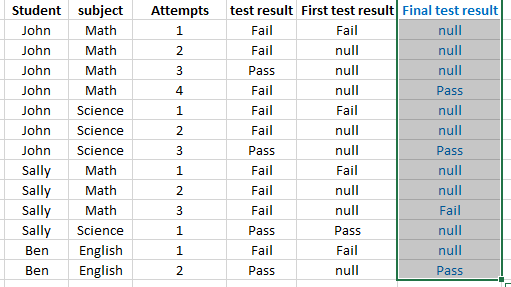
Trying to figure out the M code equivalent to add column,"final test result", in power query,
- In column "s/n", look for equivalent s/n
- In column "station", look for equivalent station,
- In column "test count", look for test count,
output
- if "test count" is not highest, output =null
- if "test count" is higest, output= test result.
Below is a sample data (actual data >1m rows)
Solved! Go to Solution.
You can use Group By:
let
Source = Table1,
#"Grouped Rows" = Table.Group(Source, {"Srudent", "subject"}, {{"LastAttempt", each List.Max([Attempts]), type number}, {"AllData", each _, type table}}),
#"Expanded AllData" = Table.ExpandTableColumn(#"Grouped Rows", "AllData", {"Attempts", "test result"}, {"Attempts", "test result"}),
#"Added Custom" = Table.AddColumn(#"Expanded AllData", "Final Test Result", each if [Attempts] = [LastAttempt] then [test result] else null),
#"Removed Columns" = Table.RemoveColumns(#"Added Custom",{"LastAttempt"})
in
#"Removed Columns"
Hi @vincentakatoh,
I did not understand the comparison value, it follows Power M:
Table.AddColumn(last Steps , "Name Column", each if [Test Count] > "?" then [test result] else "null")
Hi @EvertonPessoa,
Thanks. Will try another example as below:
I can get the "First test results quickly, by using below
"First Test Result", each if [Attempts] = 1 then [test result] else null
Nonetheless, struggling to add column "Final test result"
The intend is to get the final (last attempt) test result for each "student" and "subject". There is no limit on number of attempts for each subject.
You can use Group By:
let
Source = Table1,
#"Grouped Rows" = Table.Group(Source, {"Srudent", "subject"}, {{"LastAttempt", each List.Max([Attempts]), type number}, {"AllData", each _, type table}}),
#"Expanded AllData" = Table.ExpandTableColumn(#"Grouped Rows", "AllData", {"Attempts", "test result"}, {"Attempts", "test result"}),
#"Added Custom" = Table.AddColumn(#"Expanded AllData", "Final Test Result", each if [Attempts] = [LastAttempt] then [test result] else null),
#"Removed Columns" = Table.RemoveColumns(#"Added Custom",{"LastAttempt"})
in
#"Removed Columns"
If you have recently started exploring Fabric, we'd love to hear how it's going. Your feedback can help with product improvements.
A new Power BI DataViz World Championship is coming this June! Don't miss out on submitting your entry.
Share feedback directly with Fabric product managers, participate in targeted research studies and influence the Fabric roadmap.
| User | Count |
|---|---|
| 48 | |
| 43 | |
| 39 | |
| 19 | |
| 17 |
| User | Count |
|---|---|
| 69 | |
| 63 | |
| 32 | |
| 30 | |
| 23 |