cancel
Showing results for 
Search instead for 
Did you mean: 

Learn from the best! Meet the four finalists headed to the FINALS of the Power BI Dataviz World Championships! Register now

Reply
vincentakatoh
Helper IV
Helper IV

Power Query Conditional columns

Hi, 

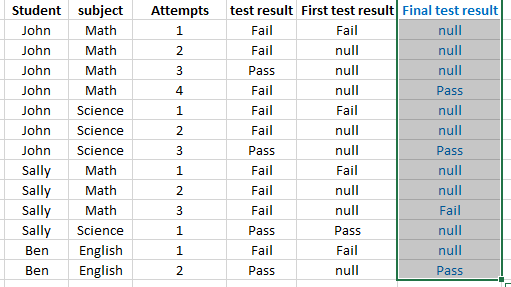
Trying to figure out the M code equivalent to add column,"final test result", in power query, 


- In column "s/n", look for equivalent s/n

- In column "station", look for equivalent station, 

- In column "test count", look for test count, 


output

- if "test count" is not highest, output =null

- if "test count" is higest, output= test result. 


Below is a sample data (actual data >1m rows)

2017-06-15 00_13_29-Book1 - Excel.png


1 ACCEPTED SOLUTION

You can use Group By:


Group By 3.png


let
    Source = Table1,
    #"Grouped Rows" = Table.Group(Source, {"Srudent", "subject"}, {{"LastAttempt", each List.Max([Attempts]), type number}, {"AllData", each _, type table}}),
    #"Expanded AllData" = Table.ExpandTableColumn(#"Grouped Rows", "AllData", {"Attempts", "test result"}, {"Attempts", "test result"}),
    #"Added Custom" = Table.AddColumn(#"Expanded AllData", "Final Test Result", each if [Attempts] = [LastAttempt] then [test result] else null),
    #"Removed Columns" = Table.RemoveColumns(#"Added Custom",{"LastAttempt"})
in
    #"Removed Columns"
Specializing in Power Query Formula Language (M)

View solution in original post

3 REPLIES 3
EvertonPessoa
Helper I
Helper I

Hi @vincentakatoh,


I did not understand the comparison value, it follows Power M:


Table.AddColumn(last Steps , "Name Column", each if [Test Count] >  "?" then [test result] else "null")

Hi @EvertonPessoa

Thanks. Will try another example as below:


I can get the "First test results quickly, by using below

"First Test Result", each if [Attempts] = 1 then [test result] else null 


Nonetheless, struggling to add column "Final test result"

The intend is to get the final (last attempt) test result for each "student" and "subject". There is no limit on number of attempts for each subject. 


2017-06-15 08_37_10-.png


You can use Group By:


Group By 3.png


let
    Source = Table1,
    #"Grouped Rows" = Table.Group(Source, {"Srudent", "subject"}, {{"LastAttempt", each List.Max([Attempts]), type number}, {"AllData", each _, type table}}),
    #"Expanded AllData" = Table.ExpandTableColumn(#"Grouped Rows", "AllData", {"Attempts", "test result"}, {"Attempts", "test result"}),
    #"Added Custom" = Table.AddColumn(#"Expanded AllData", "Final Test Result", each if [Attempts] = [LastAttempt] then [test result] else null),
    #"Removed Columns" = Table.RemoveColumns(#"Added Custom",{"LastAttempt"})
in
    #"Removed Columns"
Specializing in Power Query Formula Language (M)

Helpful resources

Announcements
Join our Fabric User Panel

Join our Fabric User Panel

Share feedback directly with Fabric product managers, participate in targeted research studies and influence the Fabric roadmap.

February Power BI Update Carousel

Power BI Monthly Update - February 2026

Check out the February 2026 Power BI update to learn about new features.

FabCon Atlanta 2026 carousel

FabCon Atlanta 2026

Join us at FabCon Atlanta, March 16-20, for the ultimate Fabric, Power BI, AI and SQL community-led event. Save $200 with code FABCOMM.