Join us at FabCon Atlanta from March 16 - 20, 2026, for the ultimate Fabric, Power BI, AI and SQL community-led event. Save $200 with code FABCOMM.
Register now!The Power BI Data Visualization World Championships is back! Get ahead of the game and start preparing now! Learn more
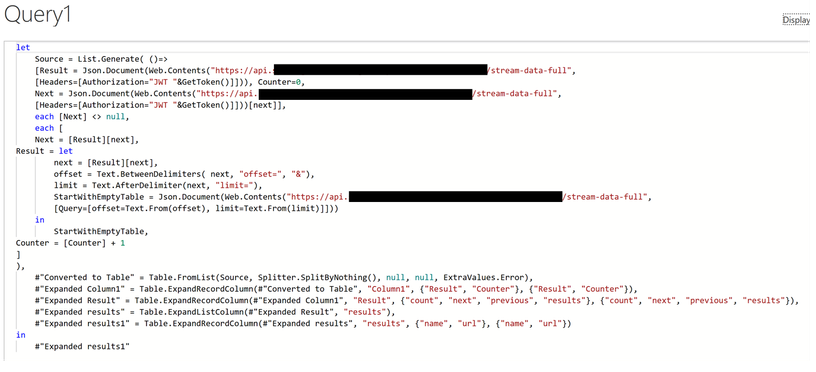
Hi, I need some help. I tried to call my IoT sensor readings via an API. The data rows produced by the Power BI is limited to 100. So, I got the below mentioned codes from one of the forums. These codes supposed to append all the chunks of 100 rows into a single table. However, at this part, the run was unsuccessful. The error I received "Enter Credentials" and it’s strange that I could run the original codes without any problem and the data auto refreshed. I thought there could be an error in the codes below. Seeking help from you. Thanks
Hi @Kathir ,
This seems to be a problem with account authorization. Please check the post below, hopefully the solution therein will help you.
I stumbled over a similar problem as you last year. I solved my api connection by buidling a custom data connector.
https://github.com/Microsoft/DataConnectors
With the connector you have a lot of possibilitys for authentication handling:
see: https://docs.microsoft.com/en-us/power-query/handlingauthentication
The custom Connector can be attached to the data gatway from there the api calls are made.
This is not a really easy way for sure but may be a solution.
Best Regards
Hi Thanks for the reply. My problem is not on authentication. My problem is on how to append each epoch of 100 records automatically.
The Power BI Data Visualization World Championships is back! Get ahead of the game and start preparing now!
| User | Count |
|---|---|
| 61 | |
| 46 | |
| 40 | |
| 38 | |
| 22 |
| User | Count |
|---|---|
| 178 | |
| 127 | |
| 117 | |
| 77 | |
| 56 |