Join us at FabCon Atlanta from March 16 - 20, 2026, for the ultimate Fabric, Power BI, AI and SQL community-led event. Save $200 with code FABCOMM.
Register now!The Power BI Data Visualization World Championships is back! It's time to submit your entry. Live now!
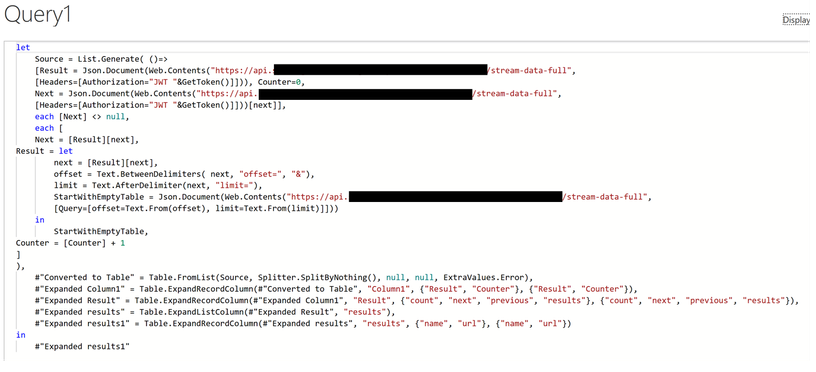
Hi, I need some help. I tried to call my IoT sensor readings via an API. The data rows produced by the Power BI is limited to 100. So, I got the below mentioned codes from one of the forums. These codes supposed to append all the chunks of 100 rows into a single table. However, at this part, the run was unsuccessful. The error I received "Enter Credentials" and it’s strange that I could run the original codes without any problem and the data auto refreshed. I thought there could be an error in the codes below. Seeking help from you. Thanks
Hi @Kathir ,
This seems to be a problem with account authorization. Please check the post below, hopefully the solution therein will help you.
I stumbled over a similar problem as you last year. I solved my api connection by buidling a custom data connector.
https://github.com/Microsoft/DataConnectors
With the connector you have a lot of possibilitys for authentication handling:
see: https://docs.microsoft.com/en-us/power-query/handlingauthentication
The custom Connector can be attached to the data gatway from there the api calls are made.
This is not a really easy way for sure but may be a solution.
Best Regards
Hi Thanks for the reply. My problem is not on authentication. My problem is on how to append each epoch of 100 records automatically.
| User | Count |
|---|---|
| 53 | |
| 40 | |
| 35 | |
| 24 | |
| 22 |
| User | Count |
|---|---|
| 135 | |
| 111 | |
| 57 | |
| 44 | |
| 38 |