This is best Fabric, Power BI, SQL and AI community event. How do we know? The last event sold out! Save €200 with code FABCMTY200.
Register nowA new Data Days event is coming soon! This time we’re going bigger than ever. Fabric, Power BI, SQL, AI and more. Don't miss out.
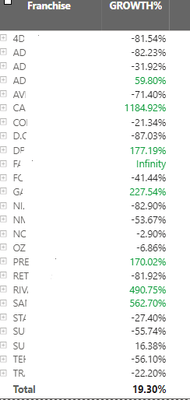
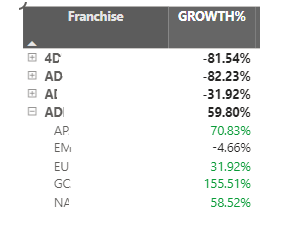
I'm able to format my visual like this using the solution of creating a measure RAG and then applying the conditional formatting based on field value for this problem - "the values in the growth% field are highlighted when the franchise value is greater than the total value 19.30% from a top view only. And this formatting should not be applied when I'm drilling down to the next column which is market"
But whenever I'm trying to filter out any of the market value this conditional formatting is not working. For example I want to filter out America from the Market column value
RAG = IF( NOT ISFILTERED(yourdata[Market]) && [Growth] > 0.0193, "Green")
How do you filter out America from the Market column value? I don't see that from the screenshot. Perhaps you can share some more screenshots to show the current result and expected result to make it more clear?
Best Regards,
Jing
Please provide sample data that covers your issue or question completely, in a usable format (not as a screenshot).
Do not include sensitive information or anything not related to the issue or question.
If you are unsure how to upload data please refer to https://community.fabric.microsoft.com/t5/Community-Blog/How-to-provide-sample-data-in-the-Power-BI-...
Please show the expected outcome based on the sample data you provided.
Want faster answers? https://community.fabric.microsoft.com/t5/Desktop/How-to-Get-Your-Question-Answered-Quickly/m-p/1447...
Check out the May 2026 Power BI update to learn about new features.
Sign up to receive a private message when registration opens and key events begin.
If you have recently started exploring Fabric, we'd love to hear how it's going. Your feedback can help with product improvements.
| User | Count |
|---|---|
| 29 | |
| 25 | |
| 25 | |
| 21 | |
| 14 |
| User | Count |
|---|---|
| 61 | |
| 50 | |
| 25 | |
| 20 | |
| 20 |