cancel
Showing results for 
Search instead for 
Did you mean: 

Next up in the FabCon + SQLCon recap series: The roadmap for Microsoft SQL and Maximizing Developer experiences in Fabric. All sessions are available on-demand after the live show. Register now

Reply
architsharma09
Frequent Visitor

Power BI Matrix Conditional Formatting

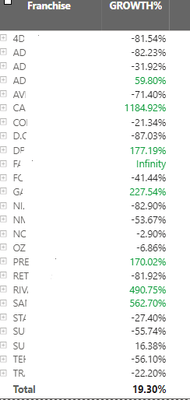
I'm able to format my visual like this using the solution of creating a measure RAG and then applying the conditional formatting based on field value for this problem - "the values in the growth% field are highlighted when the franchise value is greater than the total value 19.30% from a top view only. And this formatting should not be applied when I'm drilling down to the next column which is market"


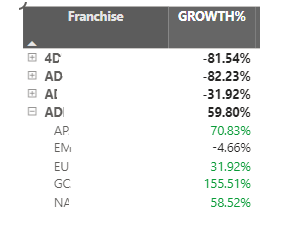
But whenever I'm trying to filter out any of the market value this conditional formatting is not working. For example I want to filter out America from the Market column value


architsharma09_0-1706870839816.png

architsharma09_1-1706870848248.png

RAG = 
IF( NOT ISFILTERED(yourdata[Market])
&& [Growth] > 0.0193, "Green")


@speedramps 

2 REPLIES 2
Anonymous
Not applicable

Hi @architsharma09 


How do you filter out America from the Market column value? I don't see that from the screenshot. Perhaps you can share some more screenshots to show the current result and expected result to make it more clear?


Best Regards,
Jing

lbendlin
Super User
Super User

Please provide sample data that covers your issue or question completely, in a usable format (not as a screenshot).

Do not include sensitive information or anything not related to the issue or question.

If you are unsure how to upload data please refer to https://community.fabric.microsoft.com/t5/Community-Blog/How-to-provide-sample-data-in-the-Power-BI-...

Please show the expected outcome based on the sample data you provided.

Want faster answers? https://community.fabric.microsoft.com/t5/Desktop/How-to-Get-Your-Question-Answered-Quickly/m-p/1447...

Helpful resources

Announcements
New to Fabric survey Carousel

New to Fabric Survey

If you have recently started exploring Fabric, we'd love to hear how it's going. Your feedback can help with product improvements.

Power BI DataViz World Championships carousel

Power BI DataViz World Championships - June 2026

A new Power BI DataViz World Championship is coming this June! Don't miss out on submitting your entry.

FabCon and SQLCon Highlights Carousel

FabCon &SQLCon Highlights

Experience the highlights from FabCon & SQLCon, available live and on-demand starting April 14th.

March Power BI Update Carousel

Power BI Community Update - March 2026

Check out the March 2026 Power BI update to learn about new features.